



WordPress Scheduled Posts and How to Choose the Right Rhythm
WordPress scheduled posts are articles that appear on your site at times you have planned in advance. The tool described here turns that idea into a routine. You decide how far apart posts should be and whether the oldest or a random text comes next, and the software does the waiting and the publishing. Its strength is pacing. Instead of a burst of posts on a busy weekend and silence for weeks, your blog gets an even, believable rhythm, and you can see at any time when the next post is due.

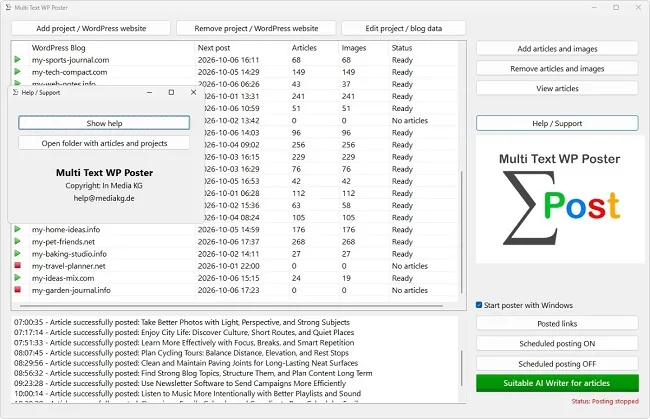
With WordPress scheduled posts there are two adjustments that shape the impression your blog makes: the gap between two publications and the order of the articles. Both can be set per project in Multi Text WP Poster. The choice looks manageable at first, but it has consequences you only notice on closer inspection: a random share shifts the time of day from post to post, and the order decides whether your readers experience a logical sequence or a colorful jumble. This article works through the options for WordPress scheduled posts with numbers.
Two Operating Modes with Intervals in Days or Minutes
When you create or edit a project, you choose between two modes. In the first you specify the interval in whole days, in the second in whole minutes. The smallest permitted value is one in each case. The program does not accept decimals or zero and points this out with a message. Exactly one mode is active at any time; both at once are not provided for.
Day mode suits everything an ordinary blog needs from WordPress scheduled posts: one post per day, every two days, once a week. You think in calendar intervals and do not have to work out how many minutes that is. Minute mode is meant for shorter cycles of WordPress scheduled posts, for example every 90 minutes or four times a day, or for a test run where you do not want to wait days for the next post.
Both modes of WordPress scheduled posts have a random share built in that cannot be switched off. In day mode the date shifts by up to 240 minutes forward or backward, in minute mode by up to 30 percent of the set interval. The dialogs point to this with the labels "+/- 240 minutes random" and "+/- 30% random". The following sections show what this means in practice.
Day Mode and Why a Day Is Never Exactly a Day
If you set an interval of one day for WordPress scheduled posts, the gap between two posts is not exactly one day but a period between 20 and 28 hours. The program takes the last scheduled date, adds the days and then rolls an offset of between minus and plus four hours on top. A post that goes out today at 10 a.m. will be due tomorrow at 6 a.m. at the earliest and 2 p.m. at the latest.
Because every date builds on the previous one, the time of day of your WordPress scheduled posts drifts over time. If the automaton starts at 10 a.m., after two weeks it may sit at 8:30 a.m. and after four weeks at noon. To readers this looks natural, as if someone really were publishing by hand. If you need a fixed time, for example for a newsletter that always points to new posts at 7 a.m., you should not use the automaton for that purpose or should announce the posts by other means as well.
| Set interval | Actual gap between two posts |
|---|---|
| 1 day | 20 to 28 hours |
| 2 days | 44 to 52 hours |
| 3 days | 68 to 76 hours |
| 7 days | 164 to 172 hours |
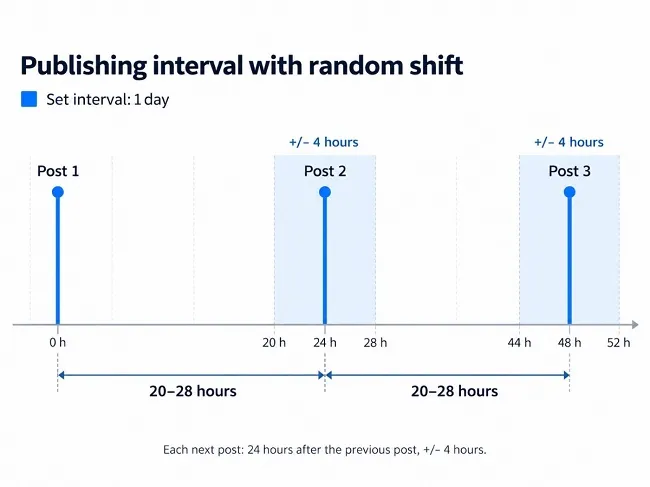
The four-hour swing stays the same for every interval of WordPress scheduled posts. With a weekly rhythm it hardly matters, with a daily one it clearly does.
Minute Mode with a Variable Percentage
Here the program calculates differently. The deviation is up to 30 percent of the set value, so it grows with the interval. If you set 60 minutes, you get gaps between 42 and 78 minutes. At 240 minutes they lie between 168 and 312 minutes. The randomness thus scales with the order of magnitude and feels similarly strong for short and long intervals.
| Set value | Shortest gap | Longest gap |
|---|---|---|
| 30 minutes | 21 minutes | 39 minutes |
| 60 minutes | 42 minutes | 78 minutes |
| 120 minutes | 84 minutes | 156 minutes |
| 240 minutes | 168 minutes | 312 minutes |
A word of caution: short gaps between WordPress scheduled posts carry a risk that has nothing to do with technology. If you publish a new article every 30 minutes, you fill the home page with new material in no time, and older posts slip out of view immediately. Search engines and readers do not automatically reward a high pace. What counts is still the quality of each individual text. For continuous operation of WordPress scheduled posts, longer intervals are almost always the better choice. Minute mode is mainly suited to test runs or to projects that are meant to work down a stock quickly on purpose.
Why the Random Share Makes Sense
A blog whose WordPress scheduled posts go out at exactly the same time down to the second every day stands out. People are rarely that punctual. The random share makes your publication times scatter the way they usually do in real editorial work. In addition, visits from readers who come to your site regularly spread over different times of day.
A second, practical advantage of WordPress scheduled posts shows up with several projects. If all blogs became due at exactly the same minute, the program would have to work through them one after another, and individual posts would arrive late. The scatter pulls the dates apart, and each project gets its turn in its own time.
Still, you should not overrate the randomness in WordPress scheduled posts. It is not a trick to fool search engines and does not replace sensible editorial planning. It merely makes the process less mechanical. Whether a post appears at 9:12 a.m. or 10:40 a.m. will as a rule play no part in your ranking. For how your readers perceive the site and for the load on the technology, however, the scatter is pleasant.
The Order by Date or at Random
The second setting for WordPress scheduled posts concerns which article appears next. You have two options. "By article date" means that the oldest file goes first. This refers to the modification date of the file in the folder, not to a date inside the text. If two files have exactly the same date, the file name decides, in alphabetical order.
"Random article" picks any text from the stock at each date. There is no order at all; every article has the same chance on every pass. Both variants make sense. Date order is needed by anyone planning a build-up: first the basics, then the deep dive, then special cases. Randomness suits collections without an inner connection, such as individual guide topics that can be read in any order.
If you want to control the order of your WordPress scheduled posts, you have two simple levers. During import the file date is preserved, so the order of your filing still applies. In addition, numbered naming helps, because with an identical date the program sorts by name. With four-digit numbers at the start, such as 0001, 0002 and 0003, the sequence is unambiguous even if a copy operation gave all files the same timestamp.
Worked Examples on How Long a Stock Lasts
The random share shifts every single date of your WordPress scheduled posts but does not change the average. The deviation upward and downward is equal, so the fluctuations even out over many posts. For planning you can therefore calculate with the set value. Three examples show what that looks like for WordPress scheduled posts.
A guide blog has 45 articles in the folder and publishes one every two days. The stock then lasts about 90 days, a quarter. A niche site with 60 texts and a daily rhythm is empty after roughly two months. If the same stock is worked down in minute mode at 120 minutes, on average twelve posts appear per day, and after about five days everything is out. This case shows exactly why short intervals should be chosen with care: what took weeks of effort is completely online after one working week, and then there is silence.
Use the calculation for WordPress scheduled posts the other way round too. If you know you can deliver new texts in three months and have 30 articles, an interval of three days is the right choice. In this way the gap between stock and rhythm closes by itself, and the folder does not run empty before restocking arrives.
Finding the Right Setting for Your WordPress Scheduled Posts
Which combination makes sense for WordPress scheduled posts depends less on the tool than on the character of your site. The following overview offers starting points that you can adjust after the first few weeks.
| Plan | Mode and interval | Order |
|---|---|---|
| Guide blog with calm growth | days, every 2 to 3 days | random article |
| Series with parts that build on each other | days, every 3 to 7 days | by article date |
| Niche site with a large text package | days, daily | random or by article date |
| Trial run with two or three articles | minutes, 30 to 60 | does not matter |
After setup it is worth checking the "Next post" column of your WordPress scheduled posts to see when the first post is due, and comparing the settings with your impression after one or two weeks. Changes are possible at any time via "Edit project / blog data". While you work in the dialog, posting is paused, so you can change things undisturbed.