



MSGtoEML Converter for Outlook MSG to EML Free Download
Last updated on July 10, 2026 – IN MEDIAKG TIProfessional MSGtoEML converter with maximum compatibility for converting Microsoft Outlook messages for use with other email clients.

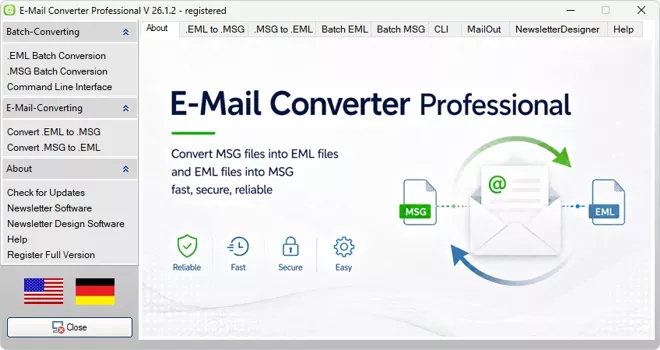
E-Mail Converter Professional converts saved Microsoft Outlook MSG files locally on your PC into EML files. MSGtoEML supports individual messages, complete folders, subfolders, and larger email archives. The tool is designed for archiving, migration, exchange with other email clients, Windows 11 transitions, and professional workflows in which attachments, message content, and relevant email metadata must remain available.
The conversion runs without uploading confidential emails to an online service. Users control the source files, destination folders, and generated result files. In addition to MSGtoEML, E-Mail Converter Professional supports EMLtoMSG, providing both conversion directions for saved Outlook MSG files and standard EML email files in one Windows application.
MSGtoEML Features and Technical Specifications
Technical Specifications for the MSGtoEML Converter Tool
Product: MSGtoEML Converter Tool for Outlook Email FilesWindows
Conversion Directions: Outlook MSGtoEML and EMLtoMSG
Processing Modes: Individual files, multiple files, complete folders, subfolders, and large email archives
Supported File Formats: MSG and EML
Typical Uses: Email archiving, Windows 11 migration, Outlook archive conversion, batch processing, backup, documentation, and preparation for other email clients
Features, Special Characteristics, and Unique Features
- Designed for maximum compatibility when converting Microsoft Outlook MSG files to EML
- Converts Microsoft Outlook MSG files to EML
- Also converts EML files back to Outlook MSG
- Processes individual files, complete folders, and subfolders
- Supports batch conversion for large email archives
- Preserves attachments, message content, and relevant metadata
- Retains sender, recipients, CC and BCC fields, date, and subject
- Preserves HTML and plain-text email content
- Runs locally on the Windows PC without uploading email files
- Includes a Command Line Interface for recurring and script-based conversions
- Combines MSGtoEML and EMLtoMSG in one tool
- Supports Windows 11 migration and old Outlook MSG archives
Professional MSGtoEML Converter for Outlook Email Archives
Convert Saved Outlook Messages from Projects and Customer Folders
Important business messages are often stored as individual MSG files in project folders, customer directories, support archives, or case-related file structures. These files may contain the message text, sender, recipients, date, subject, technical headers, and attachments. MSGtoEML converts the saved Outlook messages into EML files so they can be archived, reviewed, shared, and processed outside the original Outlook environment.Project communication can include offers, approvals, technical coordination, invoices, contract documents, and support histories. Local conversion keeps these files within the user’s own system while creating a consistent result format. The generated EML files can be filed by customer, project, year, department, or case and remain available as individual messages for later review.
Transfer Old MSG Archives into Usable EML Collections
Older Outlook archives often contain hundreds or thousands of MSG files accumulated over many years. Files may be distributed across backups, former user profiles, network folders, project directories, and exported mail collections. Opening and processing each file individually is inefficient and does not create a controlled migration workflow.The Batch MSG to EML converter processes larger collections in one operation. Old Outlook messages can be transferred into EML files while preserving relevant content and attachments. The resulting files can be backed up, reorganized, handed over to other departments, or prepared for use with compatible email clients and archive systems.
Prepare Outlook Messages for Other Email Clients and Archive Systems
MSG is closely associated with Microsoft Outlook. Other email applications and archive environments may not handle MSG files in the same way or may require additional tools. EML is a widely used file format for individual email messages and can be processed by many email clients and file-based archive workflows.MSGtoEML creates EML files from saved Outlook messages so that email data is less dependent on a single Outlook installation or profile. This is useful when messages need to be exchanged with colleagues, customers, service providers, administrators, or users of other email systems.
Key MSGtoEML Conversion Capabilities
- Convert individual Microsoft Outlook MSG files to EML
- Process complete folders and subfolders in batch mode
- Preserve attachments, message content, and relevant metadata
- Prepare old Outlook archives for migration and long-term storage
- Run conversions locally without uploading email files
- Use MSGtoEML and EMLtoMSG in the same Windows application
- Integrate recurring conversions through the Command Line Interface
How MSGtoEML Converts Outlook MSG Files to EML
What an Outlook MSG File Contains
An MSG file stores a single Microsoft Outlook message as a file. Depending on the original email, it can contain the sender, recipients, CC and BCC fields, date, subject, plain-text content, HTML content, message headers, embedded elements, and file attachments. These components form the context of the email and must be handled together during a useful conversion.MSGtoEML is therefore more than a change of the file extension. The converter reads the saved Outlook message and creates a corresponding EML file from the available email structure. The objective is to retain the practical and documentary value of the original message for later filing, review, migration, and exchange.
Why EML Is Useful for Archives and Migration
An EML file also represents an individual email message, but it is used by a broad range of email programs and archive environments. It is suitable for collections in which messages need to remain available as separate files instead of being locked inside a complete mailbox or an old Outlook profile.EML files can be organized in ordinary folder structures by customer, project, year, employee, case, or document type. Individual messages can be reviewed and transferred separately. This makes EML useful for file-based email archives, controlled migrations, backups, documentation, and exchange with systems that do not rely on Outlook MSG files.
What Is Preserved During MSGtoEML Conversion
A complete email conversion must preserve more than the visible message text. MSGtoEML takes the available message content and technical context into account when creating the EML file. Depending on the original MSG message, the conversion can include sender and recipient data, CC and BCC information, date, subject, text and HTML bodies, message headers, formatting, and related attachments.Preserving this context is important for business communication. A message without its date, sender, recipients, or attachment structure may no longer be understandable or usable as documentation. MSGtoEML keeps the relevant email components together in the generated EML file so that the result can be checked and archived after conversion.
MSGtoEML Converter for Individual Outlook Messages
Select and Convert Individual MSG Files
Individual conversion is useful when only specific messages are required. A customer email, contract draft, invoice, support response, project approval, or technical clarification may exist as a separate MSG file. Users select the relevant Outlook MSG file and define where the generated EML file should be saved.The original MSG file remains available while a corresponding EML version is created. This allows important messages to be stored in a more portable format without changing the source file. Individual conversion is also suitable for checking compatibility before processing a larger archive.
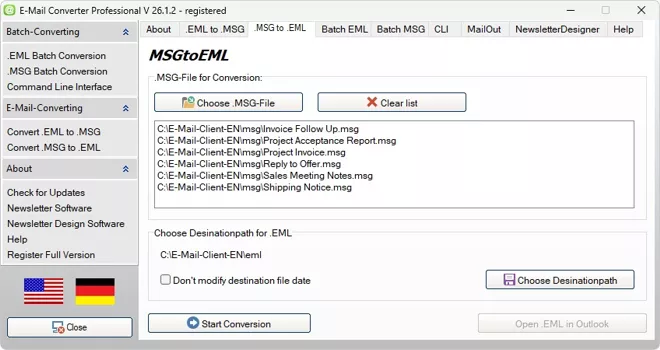
Review the Generated EML File
After conversion, the resulting EML file can be opened and reviewed in a compatible application. Users can check whether the message text, date, subject, sender, recipients, and attachments are available as expected. This verification is especially important for invoices, offers, contractual communication, technical documentation, and legally relevant email records.A reviewed EML file can then be filed with related project documents, copied to a backup, sent to another department, or prepared for import into another email environment. The result remains an individual email file that can be handled separately from the original Outlook profile.
Share and Import EML Files
Sending an MSG file to a recipient without a suitable Outlook environment can create compatibility problems. Converting the message to EML provides a format that can be processed by many email applications and archive tools. This is useful for handovers between companies, departments, service providers, and users of different mail systems.The generated EML files can also support migration projects in which selected messages need to be imported, reviewed, or stored independently. MSGtoEML gives users a controlled way to prepare specific Outlook messages for these tasks.
Batch MSG to EML Converter for Complete Folders and Subfolders
Convert Large MSG Collections in One Operation
Large Outlook archives may contain hundreds or thousands of MSG files. Manual individual conversion takes time, increases the risk of inconsistent results, and makes it difficult to maintain a clear source and destination structure. The Batch MSG to EML Converter processes larger file collections in a continuous workflow.Users can select a prepared source collection and create EML files in a defined destination location. This is suitable for Outlook exports, project archives, customer folders, support collections, user backups, and historical email directories. Batch conversion reduces repetitive manual work while creating a consistent result format.
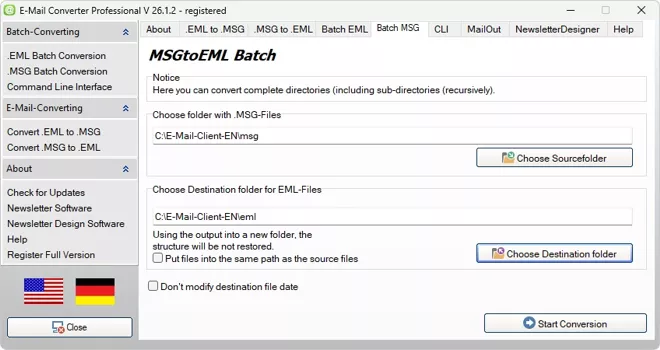
Process Complete Folder Structures
Email archives are often organized by customer, project, year, department, employee, or case. These folder structures provide context and help users find messages later. MSGtoEML can process complete folders and subfolders so that larger collections do not have to be selected message by message.A controlled folder-based workflow is particularly valuable for business archives. Offers, approvals, support histories, invoices, and attachments remain associated with the relevant project or customer structure. Source and destination locations can be kept separate so that original MSG files and generated EML files remain clearly distinguishable.
Use Batch Conversion for Recurring Workflows
In many organizations, new MSG files are generated regularly in export folders, project directories, support archives, or backup locations. Repeating the same conversion manually for every new file is inefficient. Batch processing allows recurring collections to be handled according to a consistent procedure.Administrators and technical users can define a stable workflow for source folders, destination folders, archive naming, review, and subsequent backup. When combined with the Command Line Interface, MSGtoEML can also become part of script-based technical processes.
Typical Batch MSGtoEML Use Cases
Batch conversion is designed for situations in which many saved Outlook messages must be processed consistently. Typical applications include:
- Old Outlook exports containing many MSG files
- Customer folders with ongoing communication
- Project archives with approvals and attachments
- Support collections and technical inquiries
- User profile backups and migrated file servers
- Recurring archives of saved business emails
MSGtoEML for Windows 11 and the Transition from Classic Outlook
Preserve Existing MSG Archives When Moving to Windows 11
Support for Windows 10 ended on October 14, 2025, causing many private users and organizations to move existing systems, applications, and email archives to Windows 11. During this transition, old Outlook MSG files often remain distributed across project folders, customer directories, backups, network storage, and former user profiles.A Windows upgrade does not automatically organize or migrate these individual email files. Even when a current Outlook version can open a single MSG file, opening files one by one is not an efficient solution for a large historical archive. MSGtoEML provides a structured conversion workflow for individual messages, complete folders, subfolders, and larger collections.
Prepare MSG Files for the New Outlook and Other Email Environments
The new Outlook for Windows differs from classic Outlook and from the former Windows Mail application. Microsoft currently supports opening individual MSG files in the new Outlook, but this does not eliminate the need to reorganize and migrate large file-based MSG archives. Current documentation also notes that opening saved MSG, EML, and OFT files in the new Outlook requires an active Internet connection and may be subject to file-size limits.MSGtoEML converts local Outlook MSG files into EML files that can be stored independently of an old Outlook installation or profile. The resulting files can be reviewed individually, transferred to compatible email applications, used in file-based archives, or prepared for supported import workflows.
Convert Complete MSG Folders Instead of Opening Files Individually
Historic email archives can contain thousands of MSG files arranged by customer, project, employee, year, or case. Manual opening does not create a consistent archive, preserve a repeatable migration process, or help users convert complete directory structures. This is where batch conversion becomes decisive.The Batch MSG to EML converter processes complete folders and subfolders and writes the results to a defined destination. Confidential email collections remain on the local PC during conversion. This makes the tool useful before, during, or after a Windows 11 migration when old Outlook messages need to remain accessible and transferable.
Use EML Files with Current Outlook Import Workflows
Microsoft provides a bulk import function for EML files in the new Outlook. According to Microsoft’s current documentation, this import processes only top-level EML files from the selected folder, ignores files in subfolders, and applies a 14 MB size limit per EML file. These restrictions make careful preparation and folder planning important for larger archives.MSGtoEML can create the EML files required for such workflows, while users retain control of the source archive and conversion destination. The converter does not remove Outlook’s own import limitations, but it provides a practical way to transform old MSG collections into the EML format used by the available import function.
Why MSGtoEML Is Valuable During a Windows 11 Migration
- Preserve old Outlook messages outside their original user profile
- Convert complete MSG folders and subfolders in batch mode
- Prepare email collections for the new Outlook and other compatible clients
- Keep attachments, message content, and relevant metadata together
- Store converted messages in customer, project, yearly, or case folders
- Process confidential archives locally without cloud uploads
- Avoid opening and handling thousands of MSG files individually
MSGtoEML with Attachments, Metadata, and Complete Email Structure
Preserve Attachments and Embedded Content
Many business emails contain invoices, offers, images, contracts, spreadsheets, technical documents, or other files as attachments. These attachments may contain the most important part of the communication. A conversion that transfers only the visible text would therefore be incomplete for many archive and migration scenarios.The high-quality converter processes the saved message together with its related attachments. After conversion, the generated EML file can be opened and reviewed to confirm that the message and its associated documents remain available together.
Transfer Sender, Recipients, Dates, and Subject Information
Metadata provides the context needed to understand and classify an email. Sender, recipients, CC and BCC fields, message dates, and the subject identify who communicated, when the message was sent, and how it relates to a customer, project, transaction, or case.MSGtoEML transfers the relevant available information into the generated EML file. Preserving these fields makes later review, sorting, documentation, and assignment more reliable than a simple copy of the visible message body.
Retain HTML and Plain-Text Message Content
Outlook messages may contain plain text, HTML content, formatted signatures, tables, links, or embedded elements. The visible message body must remain readable after conversion so that offers, order confirmations, support replies, and project communication retain their practical meaning.The tool creates EML files for further use in compatible email clients and archives. Message content, technical information, and attachments remain associated with the same result file, providing a complete basis for later review.
MSGtoEML for Archiving, Migration, and Documentation
Use EML Files for File-Based Email Archives
EML files are suitable for archives in which every message should remain available as an individual file. Messages can be stored in normal directory structures and combined with related project documents, contracts, invoices, or technical files. This keeps important communication accessible outside a complete mailbox.MSGtoEML converts saved Outlook messages into EML files that can be organized by customer, project, year, department, or case. The result is a portable file collection that can be backed up, reviewed, and transferred independently of an old Outlook profile.
Prepare Email Collections for System and Client Changes
Changes to Windows installations, Outlook versions, email clients, user profiles, or archive systems can make old MSG collections difficult to reuse. Not every destination environment processes Outlook MSG files in the same way. Converting relevant messages to EML creates an additional migration path.Individual files, selected project directories, and complete archives can be prepared according to the scope of the migration. Important message components remain available for later import, separate storage, or exchange with other systems.
Secure Messages for Documentation and Evidence
Emails often document approvals, orders, contractual discussions, technical clarifications, customer agreements, and support decisions. These messages may need to be reviewed long after the original Outlook profile or employee account is no longer available.An EML file can be stored together with the corresponding case or project documents. Preserving message content, headers, dates, participants, and attachments helps maintain the context required for internal documentation and later verification.
MSGtoEML and EMLtoMSG in One Application
Convert Outlook MSG Files to EML
MSGtoEML is used when saved Microsoft Outlook messages need to be transferred into EML files. This direction is suitable for archiving, migration, backup, exchange with other email clients, and preparation of old Outlook collections for Windows 11 workflows.Users can process individual MSG files, complete folders, subfolders, and larger archives. Relevant message content and attachments remain associated with the generated EML files so that the results can be reviewed and reused outside the original Outlook environment.
Convert EML Files Back to Outlook MSG
E-Mail Converter Professional also supports EMLtoMSG. This direction is useful when existing EML files need to be transferred into an Outlook-oriented MSG workflow. It can be used for individual messages, mixed collections, data handovers, or archives that must be reorganized for Outlook-based processing.The reverse conversion direction reduces the need to maintain separate programs for MSGtoEML and EMLtoMSG. Users can choose the appropriate source and destination format according to the current archive or migration task.
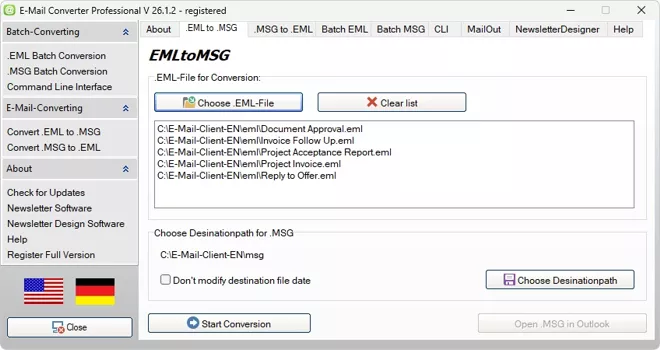
Process Complete EML Folders and Subfolders
The EMLtoMSG Batch converter can process complete EML folders and subfolders when larger collections must be transferred into MSG files. This complements MSGtoEML for organizations that work with archives from different email programs or need both conversion directions for separate projects.A consistent source and destination workflow makes it easier to distinguish original files from converted results and to prepare mixed collections for later use.
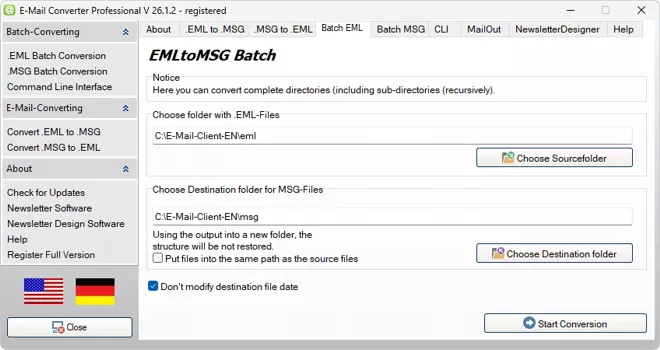
Choose the Required Conversion Direction
- MSGtoEML: convert Outlook MSG files to EML
- MSGtoEML: prepare Outlook archives for other email environments
- EMLtoMSG: convert EML files into Outlook-oriented MSG files
- Batch conversion: process complete folders in either required direction
- Mixed archives: manage MSG and EML collections in one application
Automate MSGtoEML with the Command Line Interface
Start Regular MSGtoEML Conversions from the Command Line
E-Mail Converter Professional provides a Command Line Interface for technical workflows. Administrators and advanced users can start MSGtoEML conversions with defined parameters instead of selecting every source and destination manually in the graphical interface.This is useful when new MSG files appear regularly in export folders, project directories, backup locations, or archive shares. Fixed source and destination paths make repeated conversion procedures easier to document and reproduce.
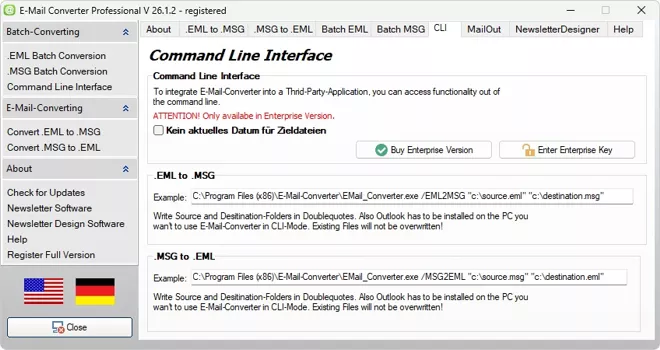
Process MSG Files with Scripts
Scripts can start recurring conversions according to an established technical process. For example, a project export folder or user backup directory can be processed according to the same source and destination pattern whenever new files are added.The generated EML files can then be passed to subsequent backup, archive, migration, review, or handover processes. This reduces manual intervention and supports consistent processing of regularly generated email collections.
Use MSGtoEML in Administrator and Service Provider Workflows
IT departments and service providers frequently receive email collections from different users, old systems, project exports, or customer backups. A repeatable conversion process helps maintain clear source data, destination structures, and conversion directions.The Command Line Interface makes MSGtoEML suitable for technical workflows in which file paths, repeatable parameters, and consistent results are more important than manual operation. This is a significant difference from simple online converters designed only for occasional single-file use.
Run MSGtoEML Locally and Protect Confidential Email Data
Convert MSG Files Without Uploading Them to an Online Service
Email files may contain customer data, invoices, offers, contracts, internal decisions, personnel information, technical details, or confidential attachments. An online converter requires the files to be transferred to an external platform before processing. This may be unsuitable for sensitive or regulated communication.E-Mail Converter Professional processes MSG files locally on the user’s Windows computer. The source messages and attachments remain within the user-controlled environment during conversion. This gives companies and private users greater control over where their email data is processed.
Control Source Files, Destination Folders, and Result Files
Users decide which MSG files are converted and where the generated EML files are stored. Original files and conversion results can be kept in separate directories, making it easier to verify the process, maintain backups, and prevent accidental replacement of the source archive.Prepared destination structures can follow customers, projects, years, departments, employees, or cases. This combines format conversion with a controlled file-management workflow instead of sending isolated messages to an unknown online storage location.
Suitable for Confidential Business and Private Archives
Local processing is relevant for law firms, agencies, companies, IT departments, self-employed professionals, and private users with sensitive archives. Customer communication, project coordination, contracts, and personal documents can be converted without deliberately uploading them to a third-party web service.The tool therefore combines MSGtoEML conversion with a locally controlled workflow for individual messages and complete archive collections.
Who Uses MSGtoEML?
Private and Professional Users with Saved Outlook Messages
Private archives may contain invoices, purchase receipts, travel documents, insurance correspondence, family communication, and older contracts stored as MSG files. Professional users may need individual customer messages, offers, approvals, or technical correspondence outside an old Outlook profile.MSGtoEML creates individual EML files that can be organized in ordinary folders, backed up, reviewed, and opened with compatible applications. This makes saved Outlook messages easier to maintain during computer changes and long-term storage.
Companies, Agencies, and Law Firms
Organizations often maintain larger collections of project emails, customer communication, orders, contracts, and internal coordination. These archives require consistent file structures, complete message context, reliable attachment handling, and local control of confidential data.Batch conversion, subfolder processing, defined destination paths, and local execution make MSGtoEML suitable for business archives that cannot be handled efficiently with a simple single-file web converter.
IT Service Providers and Administrators
Technical users work with exported mail collections, former employee folders, project archives, backups, migration data, and recurring email conversion tasks. They require repeatable processes and clear separation between source files and generated results.E-Mail Converter Professional supports individual conversion, batch processing, both MSGtoEML and EMLtoMSG directions, and a Command Line Interface. These capabilities make the application suitable for structured technical workflows and customer migration projects.
Typical MSGtoEML Users
- Private users with old Outlook email files
- Companies with project and customer archives
- Agencies and law firms with confidential communication
- IT service providers handling migration projects
- Administrators processing recurring email exports
- Archive managers organizing file-based email collections
MSGtoEML FAQ for Email Conversion
What is MSGtoEML?
MSGtoEML refers to converting a saved Microsoft Outlook MSG file into an EML file. E-Mail Converter Professional performs this conversion locally and can preserve relevant message content, metadata, and attachments. It supports individual messages, complete folders, subfolders, and larger archive collections for migration, backup, archiving, and use in compatible email applications.
Are attachments preserved with MSGtoEML?
The converter processes the email together with its related attachments so that the generated EML file retains the relevant message content and associated documents. Users can open and review the result after conversion to verify the message, metadata, and attachments.
Can MSGtoEML process multiple files at once?
The Batch MSGtoEML converter processes complete folders, subfolders, and larger MSG collections in one operation. It is suitable for Outlook exports, project archives, customer folders, backups, and recurring conversion workflows.
Does MSGtoEML work without an online service?
E-Mail Converter Professional runs locally on the Windows PC. MSG files, message content, and attachments do not have to be uploaded to a web converter. The user determines which files are processed and where the resulting EML files are stored.
Can EML also be converted to MSG?
E-Mail Converter Professional also supports EMLtoMSG for converting individual EML files and complete EML folders into Outlook-oriented MSG files. Both conversion directions are available in the same application.