



WordPress Auto Poster That Publishes Finished Articles on Autopilot
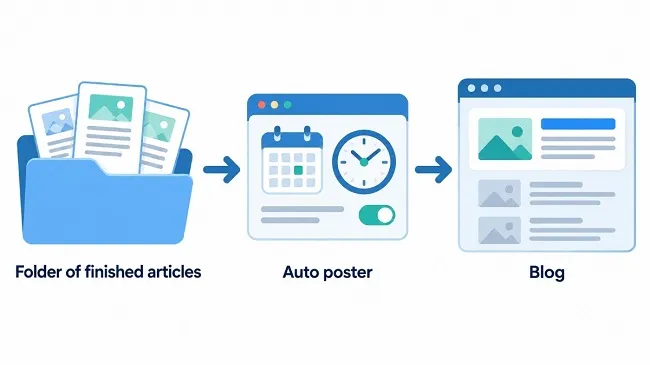
The WordPress auto poster is software that sits between your finished articles and your blog. Instead of opening the backend for every single text, you collect the articles in a folder and let the program carry them to the site one by one. It logs in with its own access code, creates each post with title, tags and images, and then waits for the next slot. The result is a blog that keeps a steady publishing pace while you work on other things. It is a desktop application that runs on your own computer, so it suits anyone who writes in batches and wants the publishing side to take care of itself.

A blog lives on regularity, but hardly anyone enjoys copying a text into the backend every second day, uploading an image, picking a category and clicking "Publish". This WordPress auto poster takes exactly that part off your hands. You write or source the articles once, drop them into a folder, and the WordPress auto poster publishes them at the pace you set. This article shows what such a tool does, how Multi Text WP Poster goes about it and who is likely to get real value from it.
What Does the WordPress Auto Poster Actually Do?
This WordPress auto poster separates two jobs that normally blur together in everyday blogging: writing and publishing. The text gets written when you have time, ideally in a batch on a quiet afternoon. The publishing happens later without any input from you, at the times you defined. In between sits a folder of finished articles.
At the agreed time the WordPress auto poster picks the next article, logs in to your site with your credentials and creates the post there, complete with title, tags and images. Then it waits for the next slot. You do not have to be logged in anywhere while this happens.
The gain is less about the minutes saved per post. A single upload might take five minutes. The real gain is predictability. If you write forty articles and distribute them by hand, you have to remember forty times, and sooner or later a week goes by in which nothing happens. If you hand them to this WordPress auto poster, your head stays free and the site still fills up evenly. Visitors and search engines also tend to see a blog with a steady rhythm as more alive than one that gets three posts on a Monday and then goes quiet for a month. Whether the WordPress auto poster shows up measurably in rankings cannot be said across the board. The one reliable effect is on you: nothing stays lying around.
How the Program Works from Folder to Published Post
The basic principle is simple. For every WordPress site you create a project. A project is a folder on your computer that holds the article files and the matching images. The project settings contain the address of the site, the user name, an application password, the interval between two posts and the order in which articles are used.
When the next scheduled time arrives, the WordPress auto poster selects an article, uploads the matching images and publishes the post. Afterwards it renames the file with the prefix #-USED-#-. That rules out the same text appearing twice, and you can see at a glance in the folder what is already online. The address of the new post goes into a list, and the next date is calculated.
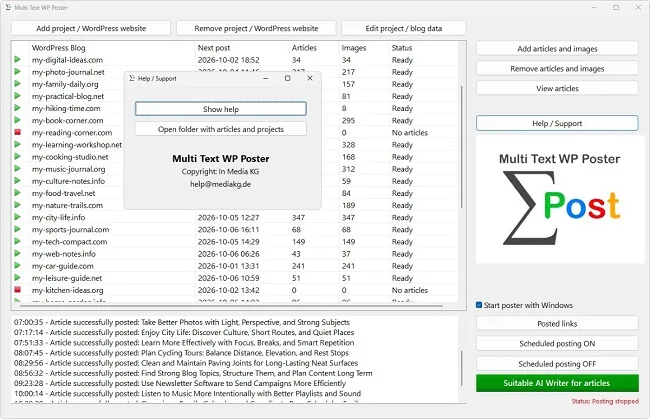
In the project overview you see, per site, the next planned post, the number of articles and images still waiting, and a status. "No articles" means the stock is empty. "Ready" means everything is on track. Day-to-day operation needs nothing more than that. How setup works in detail, how intervals can be adjusted and what an article may contain is covered in separate articles. For now the mental picture is enough: folder in, posts out.
What an Auto Poster Does Not Do for You
The WordPress auto poster publishes, it does not think along. It writes no texts, checks no facts and does not notice when an article has become outdated. Whatever sits in the folder goes out exactly as it lies there. Responsibility for quality and accuracy stays entirely with you.
It does not take over topic planning either. If you throw fifty random texts into the folder without a concept, you get a blog without a profile, just filled automatically. Anyone looking for help producing texts can use the separate AI Writer from the same company. That is a program of its own that generates articles in the matching format. It is not part of the posting itself.
Your blog also remains your blog. Answering comments, updating plugins, setting up backups and maintaining themes stay manual work. For normal publishing, WordPress needs no extra add-on beyond the application password it ships with. Only if you want to send a meta title and meta description with each article does a suitable SEO plugin need to be present on the site. And one more thing goes without saying: the computer running the WordPress auto poster has to be switched on at the scheduled time. If it is off, nothing gets posted.
Who Benefits from Automation
Those who produce texts in bursts benefit most from this WordPress auto poster. That includes bloggers who reserve one afternoon a month for writing, and niche site owners who receive articles from copywriters in larger packages. For them, the WordPress auto poster is the bridge between "everything is finished" and "everything is online, but spread out".
It also suits sites with calm, timeless content: guides, tutorials, explainers, glossaries. An article on how to repot a plant is just as useful in March as in July. It does not matter on which day it appears, only that it appears at some point and the site grows.
Agencies and owners of several websites gain from the WordPress auto poster on top of that, because each site can be run as its own project with its own rhythm. How that looks in daily operation is a topic of its own. This WordPress auto poster makes less sense for people who write only a single post per week and polish the text every time. If you only finish on publication day, there is nothing the WordPress auto poster could take over. The benefit arises where a stock exists and where the gap between finishing and publishing is chosen deliberately.
When Automation Is the Wrong Choice
Anything time-bound does not belong in an automatic process. News, announcements of dates, prices, legal changes or content about running promotions can be outdated by the moment the WordPress auto poster finally publishes them. A text that was correct in January and appears in April can, in the worst case, state wrong facts.
A second point is approval. If a post has to be seen by a boss, a client or the legal department before it goes live, you need a review step that happens before the file is placed in the folder. The WordPress auto poster publishes directly and has no approval stage. What reaches it is already online.
Third, a large stock ages. If you load a hundred texts today and spread them over a year, ask yourself beforehand whether text number 90 will still be accurate by then. A good remedy is to limit the stock and top it up regularly instead of filling it completely once. That way you stay able to change topics, correct mistakes or react to news without twelve months of content already set in stone. A practical rule of thumb: never schedule more articles than you would still stand behind in six months. Whatever goes beyond that belongs on an ideas list, not in the folder.
How Large the Article Stock Needs to Be
Before you start, a simple calculation is worthwhile: how many articles do you need for the WordPress auto poster to keep going? The following table shows the demand for a period of ninety days, roughly one quarter.
| Rhythm | Articles in 90 days | Fits |
|---|---|---|
| one post every day | 90 | large text packages and fast-paced niche sites |
| every 2nd day | 45 | blogs with regular but calm growth |
| every 3rd day | 30 | sites that also receive hand-written posts alongside the WordPress auto poster |
| once a week | 13 | beginners who want to try things out first |
For the start, the smallest value is usually enough. Begin with a dozen articles, watch for two or three weeks whether everything appears the way you imagined, and only then expand the stock. Multi Text WP Poster shows you in the project list at any time how many articles are still waiting, so you can restock before the folder runs dry.
Also plan a small buffer. If you are away for three weeks or a text fails your review, the WordPress auto poster should keep running anyway. Ten to twenty percent more articles than the calculation gives is a sensible margin for this WordPress auto poster.