



AI Sky Replacement for Dramatic Skies without Cloud and with no AI Costs
Grey overcast, washed out blue or a blown out horizon becomes a sunset or a clear summer day within seconds.A dull sky is swapped in one step with MKGpics AI PHOTO SKY REPLACER, an AI sky replacer for the PC that offers AI sky replacement for nature, city and property photos. It finds the sky by itself, cuts it out cleanly and inserts a chosen sky picture that matches light and colour of the scene.

The program fits jobs where every picture needs its own sky, its own mood and its own fine adjustment, from a single hero shot for a brochure to a favourite holiday view.
AI Sky Replacement and Its Functions
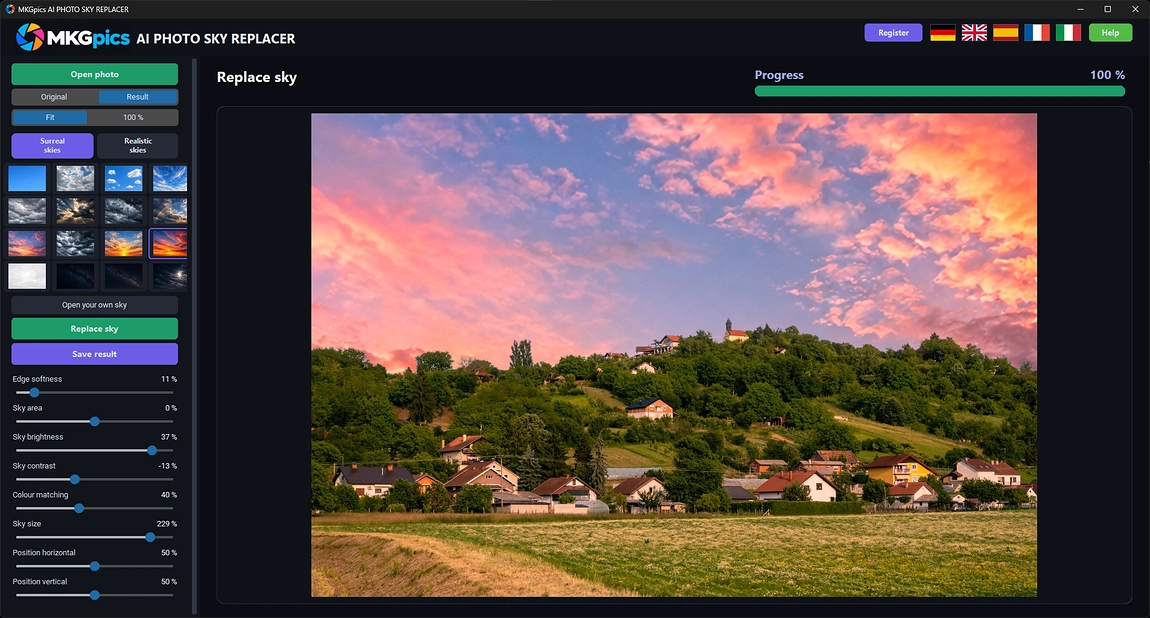
- Detects the sky in a photo fully automatically
- Replaces dull skies with sunsets, clouds or clear blue
- Two sky collections, surreal and realistic
- Thumbnail gallery to pick the new sky with one click
- Opens any own sky picture and crops it to fit
- Soft transition at horizon and treetops
- Adjustable sky area for exact detection
- Brightness and contrast of the new sky adjustable
- Colour matching adapts the sky to the foreground light
- Size and position frame the cloud pattern
- Changes show live right after the first run
- Original and Result switch plus full size view
- Saves PNG, JPG or WebP under a new file name
- Sky replacement runs locally, no photo is uploaded
- Modern Python AI libraries run locally, so the AI adds no costs
- No subscription and no ongoing costs
Professionals Who Gain from New Skies
Everyone who shoots outdoors meets a boring sky sooner or later.Anybody whose nature, street or building pictures lose their effect under a flat grey ceiling gains the most from an AI sky replacer. A better sky lifts the whole frame, because the light and the mood of a photo come largely from the top.
- Nature and travel photographers rescue grey days on location.
- Real estate agents show houses under a friendly blue sky.
- Wedding and event photographers save outdoor portraits with dead clouds.
- Drone pilots repair hazy aerial shots with a clear horizon.
- Bloggers and designers create dramatic covers and thumbnails.
- The sky swap fits beginners and hobby photographers, while professionals and designers refine transition and color.
Elements of a Convincing Sky Swap
A believable result needs a clean cut, matching light and a fitting perspective.What makes the edge believable? Leaves, antennas, hair and roof edges create a ragged border when a simple color selection is used. An AI that understands the picture separates sky from land at the pixel level, and the edge softness setting smooths the transition at the horizon.
Example: a house photographed under a flat grey ceiling. A realistic sky with soft clouds replaces it, the roof edge and the chimney stay clean, and the facade looks as if it was shot in good weather.
How does the light match? A bright orange sunset over a scene lit by flat midday sun looks fake at once. Color matching pulls the tone of the sky into the foreground, and brightness and contrast bring both layers to the same level.
Where do the clouds sit? The sky picture is enlarged beyond the photo size, and the cloud pattern moves sideways and up or down, so the best part of the sky sits where it belongs.
Example: a travel photo of a mountain village. A surreal sky with glowing colors turns it into artwork for a poster, while a realistic sky keeps a property or wedding photo believable. Both collections sit in their own folders.
Placing the New Sky in a Few Moves
With the AI sky replacer, a gallery of sky thumbnails appears at the side. Click one, then press Replace sky. The program loads the AI, detects the sky, inserts the new one and shows the finished picture.Own skies come from any JPG, PNG, WebP, BMP or TIFF picture. A crop window selects the wanted cloud section and offers the aspect ratio of the photo, so the chosen part fits without distortion.
AI sky replacement free download here
When the program finds no sky, for example in an indoor shot or a close portrait, it says so and leaves the photo untouched. Pictures with a visible horizon, treetops, rooftops or mountains work best, because the border is clearly defined.
After the first run, every change shows live. The new sky is composed again on screen without detecting the old one a second time, so trying a warmer tone or a different cloud position takes only a moment.
Launch the AI Sky Replacer in Moments
Open the photo, click a sky, press Replace sky and fine tune the look.Pick a surreal or a realistic collection first, then click a thumbnail. Hovering over a thumbnail shows a larger preview, which helps to choose between similar skies. AI sky replacement needs no selection tools and no masks.
Balanced presets for edge softness and colour matching give a good first result. Raise matching when the foreground looks too cool for the sky, and lower the brightness when the new sky outshines the scene.
» Free download now
Switch between Original and Result and inspect the horizon at full size.
At full size, the border between trees, buildings and the new sky is easy to judge. If a light fringe is visible, a softer edge helps, and if a piece of sky remains, a wider sky area catches it. Then save the result of the AI sky replacement.
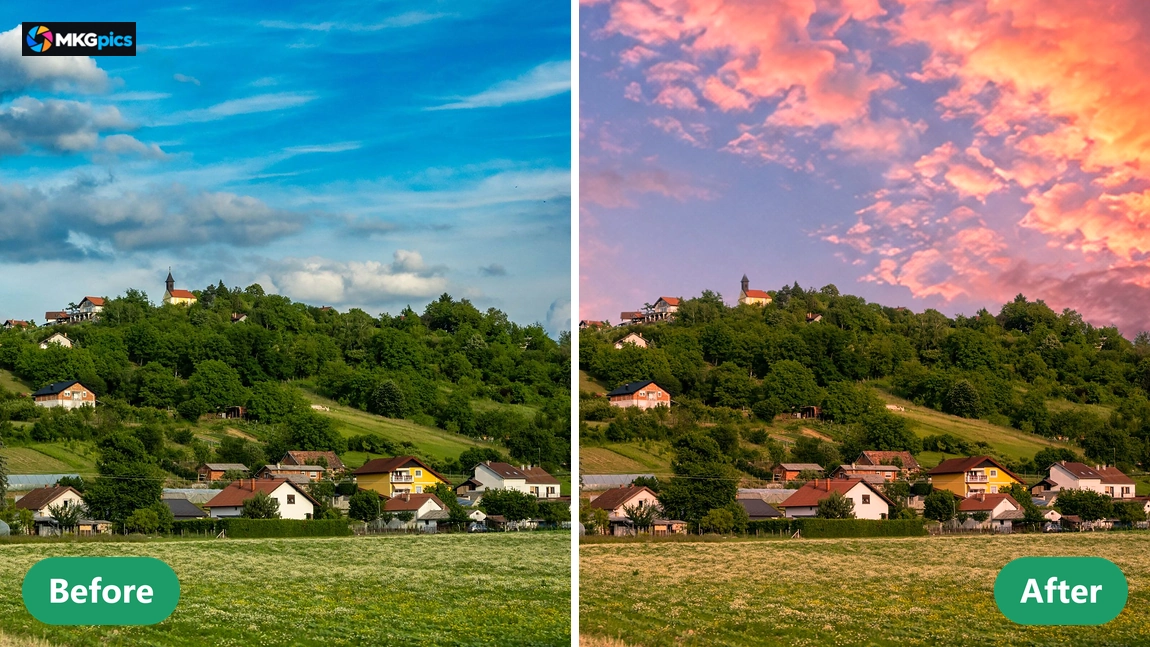
Because the source file stays untouched, the AI sky replacer yields as many versions as needed. A calm blue sky for the property listing and a fiery sunset for the social media post are made from the same original in minutes.
Dull Skies and What to Do with Them
From grey holiday views to hazy drone shots, flat skies get character.Travellers return from a trip with grey weather in every picture. A realistic sky restores the sunny day they remember, and the cityscape or beach looks as inviting as in the brochure, without a second visit to the location.
» Download free here
Real estate photographers use AI sky replacement on blown out exterior shots, designers build moody posters from surreal clouds, and drone pilots clean up hazy horizons. Each picture is handled individually, so the sky always suits the scene.
A large photo library stays useful with AI sky replacement. Weather no longer decides which pictures are publishable.
AI Sky Replacement in Questions and Answers
What does the AI sky replacer do?
It detects the sky in a photo automatically and replaces it with a chosen sky picture, then matches colour and light to the foreground.
Is the original sky photo overwritten?
No. The result is saved under a new name, and the source photo stays as it is.
Is a subscription needed for AI sky replacement?
No. The program runs on the own PC, comes as a free download and has neither subscription nor follow up expenses.
Who needs an AI sky replacer like this?
Nature and travel photographers, real estate agents, wedding and event photographers, drone pilots, bloggers and designers with dull skies.
Can I use my own sky pictures?
Yes. Any JPG, PNG, WebP, BMP or TIFF picture opens as a sky, and a crop window selects the section that fits the photo.
What adjusts the sky result?
Edge softness, sky area, brightness, contrast, colour matching, size and position change the sky live.
Does AI sky replacement work offline?
Yes, the detection and the replacement happen on the own PC. No photo leaves the computer, and processing needs no internet connection.
Which picture file types are supported?
Photos open as PNG, JPG, JPEG, WebP or BMP and are saved as PNG, JPG or WebP, and the source photo stays untouched.