



AI Object Remover for Passersby and Cables without Cloud, without a Subscription and with no AI Costs
Paint over a disturbing person, sign or wire, and the AI fills the gap with background that matches the surroundings.Unwanted elements vanish with MKGpics AI PHOTO OBJECT REMOVER, an AI object remover for the PC. A brush marks the element, one button erases it, and the program rebuilds the covered area from the texture, color and structure around it.

Each picture gets its own marking and its own check, which suits cleanups where every scene looks different and no preset fits.
The AI Object Remover at a Glance
- Erases people, signs, wires and blemishes from photos
- Rebuilds the gap with matching texture and color
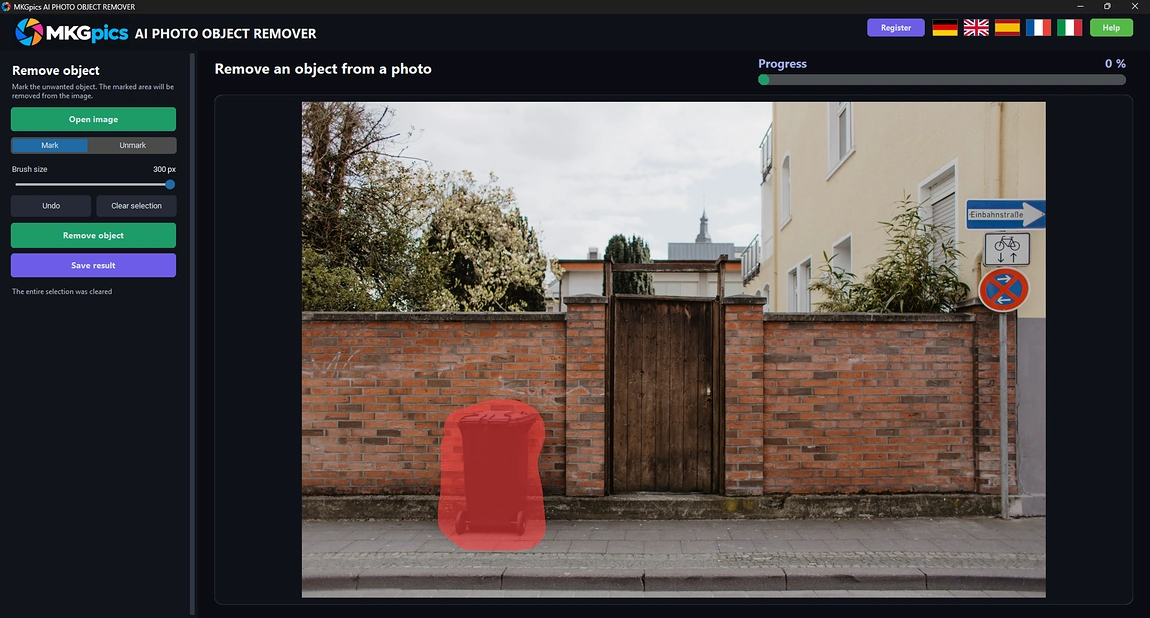
- Round brush marks the object, red overlay shows the area
- Mark and Unmark modes correct the selection
- Brush size from 4 to 300 pixels
- Undo for the selection up to 30 steps
- Clear selection resets the marking in one click
- Several objects are removed one after another
- Opens PNG, JPG, JPEG, WebP and BMP images
- Saves the retouched photo as PNG, JPG or WebP
- Retouching runs locally, no image is uploaded
- Latest local Python libraries run the AI at no cost
- No subscription and no ongoing costs
Roles That Benefit from a Cleaner Picture
It helps everyone who is annoyed by one detail that ruins an otherwise good photo.Images remain private, since the AI works on the PC itself and nothing travels to a server or into a training set. Studios, agencies and clubs keep every file in house, and private users enjoy the same control.
- Travel photographers erase tourists from landmarks and viewpoints.
- Real estate agents remove cars, bins and cables from exteriors.
- Online sellers delete dust, stickers and props from product shots.
- Portrait and wedding photographers clear strangers from group pictures.
- Hobby photographers fix holiday snapshots with photobombers and trash cans.
- Beginners paint over the object, and hobby photographers, professionals and designers clean up whole series with it.
Hallmarks of a Clean Removal
An invisible edit needs a precise marking, a believable fill and a quick way to fix mistakes.How is the marking drawn? A brush that covers the object a little beyond its outline gives the AI room to blend. A round cursor shows the exact size, so even thin poles and wires are painted accurately.
Example: a power line crosses a landscape photo. A small brush follows the wire, the AI continues the sky behind it, and the picture shows no line, no blur and no seam.
What does the AI fill in? A lawn gets grass, a wall gets brick and a sky gets a gradient, because the AI studies the neighborhood of the marked area and continues its patterns. A visible surrounding gives the best result.
What about a slip of the hand? Mark and Unmark switch the brush between adding and erasing, and the selection is undoable up to 30 times. A mistake costs a second, not the whole attempt.
Example: a crowded square in a holiday photo. Each pass removes one or two persons, the next pass starts from the last result, and after a few passes the square is empty.
Marking, Removing and Reviewing the Retouched Photo
Open an image, paint over the unwanted element and press Remove object. The result replaces the marked area in the preview right away, so the effect is judged immediately.Images in PNG, JPG, JPEG, WebP or BMP format are accepted. Finished photos are stored as PNG, JPG or WebP under a new name ending in object removed, so the source image survives untouched next to the retouched copy.
AI object remover free download here
The AI object remover needs only the marking, since the program invents fresh pixels that fit the scene instead of duplicating old ones.
Only the marked region and a margin around it are recalculated, and the rest of the picture is pasted back unchanged. Sharpness and grain elsewhere therefore stay exactly as the camera recorded them, and the edit remains invisible.
Get Started to Remove Objects from Photos AI
Three actions finish an edit: open the photo, paint the object, press Remove object.After the image is open, the brush is ready. Paint across the object once, and the red overlay shows what will vanish. Then one click starts the AI object remover and the cleaned area appears in the preview.
The brush size adapts the tool to the job. A small brush suits wires, spots and text, while a large brush covers a person in a few strokes. The default size follows the width of the loaded photo.
» Free download now
Paint slightly beyond the edge of the object, then check the result at once.
Shadows and reflections belong to the object, so they are marked as well. When a trace remains, mark it and run the removal again. Every pass builds on the last result, and the selection is undoable whenever the brush slips.
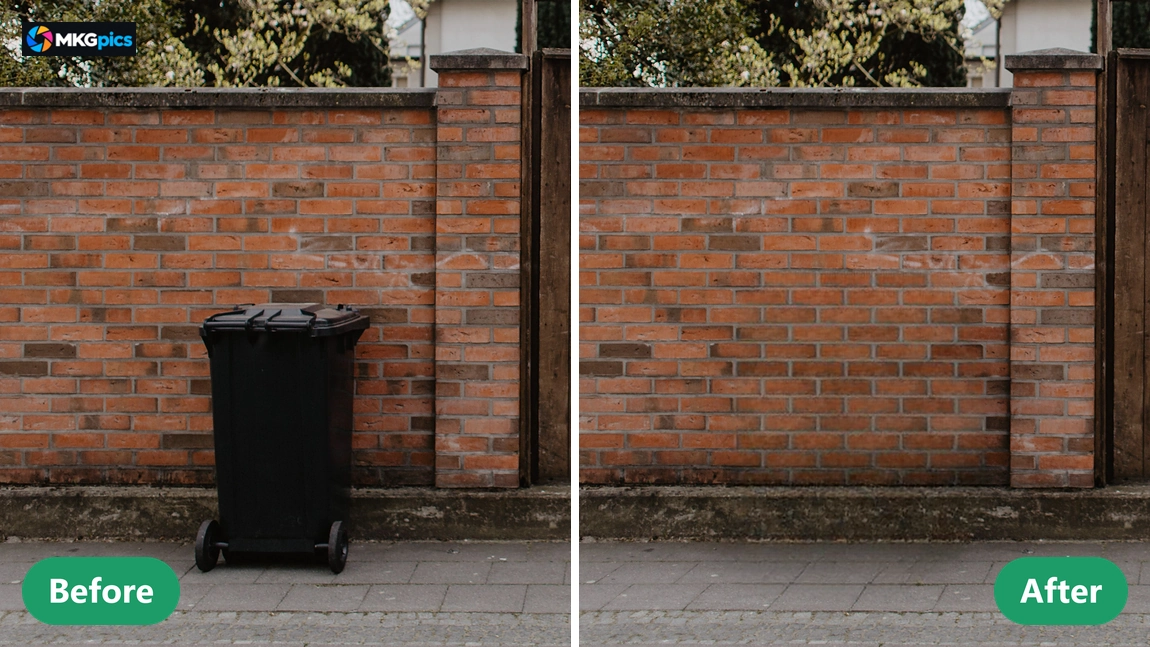
Because the program writes a new file, different attempts are kept side by side. A version with only the passersby gone and a version with the wires gone too come from the same photo, each saved under its own name.
Removal Work in Practice
From crowded landmarks to cluttered product photos, a single distraction disappears quickly.Travelers visit famous squares at noon and return with pictures full of strangers. Marking the crowd leaves an empty plaza, so the memory looks the way the place felt on a quiet morning.
» Download free here
Agents and photographers clean exteriors and use it to remove objects, from cars and bins to cables and signs. The program also erases date stamps, logos, scratches and sensor spots, and sellers clear props from product shots.
Hobby photographers use the AI object remover on photobombers, trash cans and stray hands in holiday pictures. Each scene gets its own marking.
Quick Answers on the AI Object Remover
What does the AI object remover do?
It erases marked people, signs, wires and blemishes from a photo and fills the gap with background that continues the texture and color around it.
Is the original photo overwritten after the removal?
No. The result is saved as a new file, and the original with all objects stays untouched.
Must I subscribe to remove objects from photos AI?
No. The program is a free download for the PC, runs completely on the own computer and has neither subscription nor follow up fees.
Who needs an AI object remover like this?
Travel and wedding photographers, real estate agents, online sellers and hobby photographers who want to erase distractions from pictures without uploading them anywhere.
How are unwanted objects marked in the photo?
A round brush paints over the unwanted element, a red overlay shows the selection, and the brush size is adjustable from 4 to 300 pixels.
Can I undo a wrong marking?
Yes, the selection is undoable up to 30 steps, Unmark erases parts of it, and Clear selection resets everything in one click.
Does remove objects from photos AI work offline?
Yes, the retouching runs on the own PC. No picture leaves it, and removing an object needs no internet connection.
Which formats does the program use?
Images open as PNG, JPG, JPEG, WebP or BMP and are saved as PNG, JPG or WebP, while the original stays unchanged.