



AI Image Upscaler for Small Photos and Large Prints without Cloud
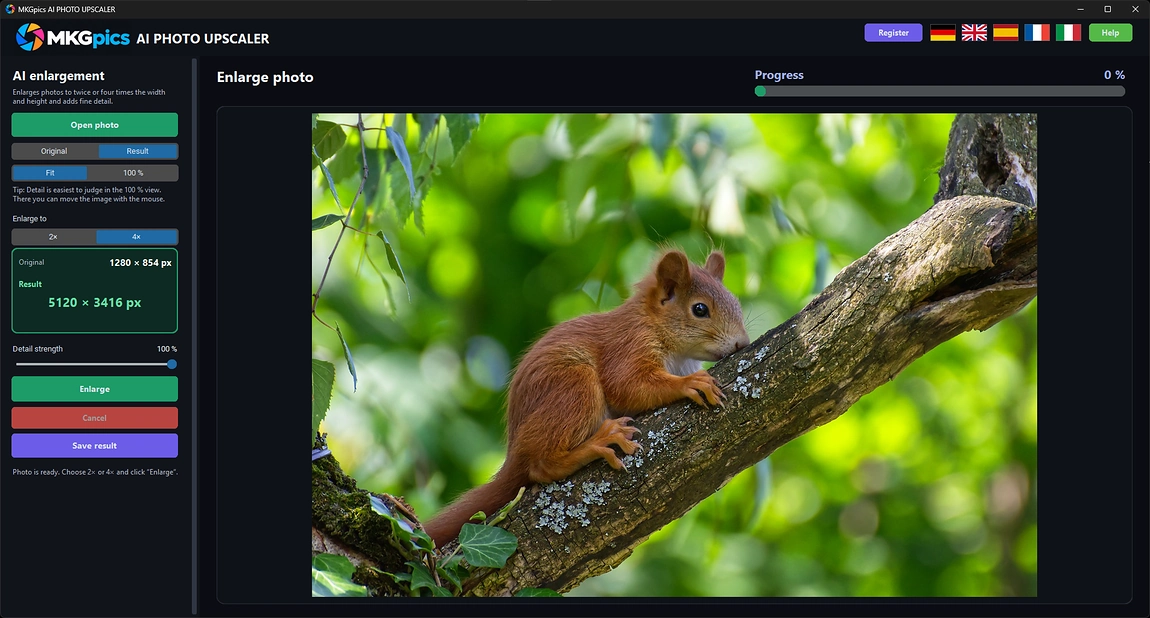
Small files become posters, banners and sharp full screen pictures, because every enlargement receives newly built detail.As an AI image upscaler, MKGpics AI PHOTO UPSCALER enlarges a photo on the PC to twice or four times its width and height. The AI paints the missing fine structure into the bigger picture, so edges, textures and lettering look natural instead of blurred.

The program suits enlargements where every picture needs its own target size, its own amount of added detail and its own look at full resolution before it goes to print or to the web.
What the AI Image Upscaler Brings to Small Photos
- Enlarges photos to twice or four times the size
- Builds new fine detail in every enlargement
- Edges, fur, lettering and foliage stay clean
- Adjustable detail strength
- Fit view and pixel exact full size view
- Switch between Original and Result at any time
- Long runs stop at any moment
- Opens PNG, JPG, JPEG, WebP and BMP pictures
- Saves the enlarged photo as PNG, JPG or WebP
- The original file is never overwritten
- Upscaling runs locally, no photo is uploaded
- Local Python AI libraries of today power the AI at no cost
- No subscription and no ongoing costs
Professions That Depend on Larger Pictures
Whenever a file is smaller than the place it is meant for, the AI image upscaler closes the gap.AI image upscaling solves the problem of low resolution. Old digital cameras, web downloads, scans and phone crops all deliver files that are too small for modern screens or large prints, and normal resizing only makes them softer.
- Photographers print large formats from cropped frames.
- Online sellers enlarge supplier pictures for shop zoom.
- Designers and bloggers fit small images into wide headers.
- Genealogists and collectors enlarge scans of old prints.
- Game and video creators raise textures and thumbnails.
- Beginners, hobby photographers, professionals and designers receive enlarged pictures with natural detail.
How Real Enlargement Differs from Stretching
A good enlargement builds plausible detail instead of copying pixels.AI image upscaling adds real information to the picture, not only more pixels. A model trained on pairs of small and large photographs predicts what belongs between the pixels and draws it.
Which factor fits which job? The 2x setting doubles width and height and fits screens and prints, while 4x multiplies the pixel count by sixteen for posters and big canvases. A smaller factor keeps the result closest to the source.
Example: a supplier sends a product picture that is too small for the shop zoom. Enlarged with 2x, the lettering on the label and the stitching of the fabric stay clear instead of dissolving into blocks.
What does the detail strength do? Full strength suits architecture, lettering and nature, while a reduced value keeps skin in portraits calm and avoids a plastic look.
Example: a phone crop of a bird has to become a wall print. 4x gives the crop enough pixels, and in the full size view the feathers show fine structure that looks natural at pixel level.
How a Photo Becomes a Larger Result
After opening a photo, choose 2x or 4x and press Enlarge. A run ends at any moment, and the larger picture then appears in the Result view.With this AI image upscaler, photos come in as PNG, JPG, JPEG, WebP or BMP. The larger result is saved as PNG for lossless quality, as JPG for small files or as WebP for the web. The source file stays exactly where it is.
AI image upscaler free download here
Resolution cannot be added by a camera afterwards, and a second shoot is impossible. A file that exists today is still turned into a usable large picture, and the new pixel dimensions are reported once the run is finished.
Changing the factor after a run asks for a new click on Enlarge, so the preview always matches the chosen size. Strength changes are quicker in AI image upscaling, because the program blends the finished enlargement on screen without calculating again.
Begin at Once with AI Image Upscaling
Open the photo, pick 2x or 4x, press Enlarge and judge the result at full size.The first run takes longer for larger pictures. Anyone who tries it on a small web image sees the difference at once, since lettering, hair and leaves stay clear instead of dissolving into blocks.
Full detail strength is the default. Lower it a little for faces, where a gentler result looks more natural, and keep it high for buildings, plants and text. Because the detail strength works on the finished picture, comparing several levels costs only seconds.
» Free download now
Save the result under a new name and keep the original as a reserve.
One workflow creates a 2x version for the screen and a 4x version for the print shop from the same file. The AI image upscaler keeps both separate, and the untouched source remains available for later experiments.
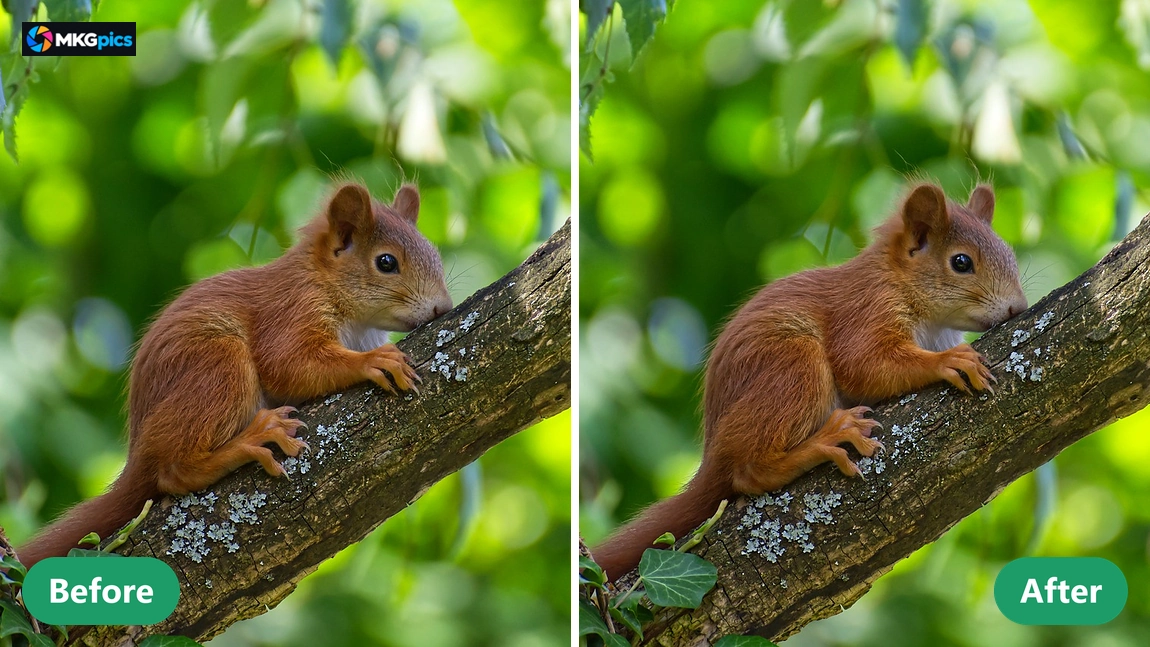
Switching between Original and Result at full size is the best proof. The small file shows soft edges and noise, while the enlarged version displays defined lines and calm surfaces at several times the pixel count.
Occasions for Small Files
From tiny product shots to scanned old photos, small files gain a second life.Shop owners receive supplier pictures with only a few hundred pixels. AI image upscaling turns them into zoomable product views that fill a modern layout, and the labels on the packaging become readable again without a new photo shoot.
» Download free here
Photographers rescue tight crops for wall art, designers fill wide website headers, and collectors enlarge scans of old portraits for framed prints. Each picture gets its own factor and strength, so portraits and architecture are never treated alike.
With the AI image upscaler, large collections of old files become useful again. Any number of pictures are enlarged whenever a project needs them.
What People Ask About the AI Image Upscaler
What does the AI image upscaler do?
It enlarges a photo to twice or four times its width and height and adds fine detail with AI, so the bigger picture stays sharp.
Does the enlargement replace the original?
No. The enlarged picture is written to a new file, and the original keeps its size and quality.
Is a subscription needed for AI image upscaling?
No. Everything runs on the own computer, the program is a free download, and no subscription or follow up expenses exist.
Who needs an AI image upscaler like this?
Photographers, online sellers, designers, bloggers, game creators and hobby photographers who own pictures that are too small for the screen or print.
What is the difference between 2x and 4x?
2x doubles width and height, while 4x quadruples them. Choose 4x for posters and big canvases, and 2x for screens and normal prints.
What does the detail strength do?
It mixes the AI detail with the plain enlargement from none to full, so portraits look gentle and buildings crisp.
Does AI image upscaling work offline?
Yes, the enlargement is calculated on the own PC. No photo leaves the computer, and no internet connection is needed.
Which file types does the program accept?
Sources load as PNG, JPG, JPEG, WebP or BMP, enlarged results leave as PNG, JPG or WebP, and the original file is never changed.