



AI Image Sharpener for Shaky Shots and Soft Lenses without a Subscription
Fur, lettering, eyelashes and leaves regain their outline, and the photo keeps exactly the same dimensions as before.MKGpics AI PHOTO SHARPENER brings crispness back to soft pictures: this AI image sharpener for the PC studies how a photo lost its focus, rebuilds the missing fine structure and keeps width and height unchanged.

The program suits rescue jobs, where each blurry shot has its own cause and deserves its own amount of sharpening and its own inspection.
Sharpening Strengths of the AI Image Sharpener
- Turns soft and blurry photos into crisp pictures
- Restores fine detail in fur, text and foliage
- Photo dimensions stay exactly the same
- Adjustable sharpening strength
- Changes show instantly without recalculation
- Fit view and pixel exact full size view
- Original and Result switch for direct comparison
- A running calculation stops at any moment
- Large photos are sharpened completely, tile by tile
- Opens PNG, JPG, JPEG, WebP and BMP sources
- Exports PNG, JPG or WebP under a new file name
- Sharpening runs locally, no photo is uploaded
- The AI relies on current local Python libraries and costs nothing
- No subscription and no ongoing costs
Groups That Profit from Sharper Pictures
It rescues the shots that matter most but came out soft.Privacy is part of the design: the AI calculates on the PC itself, so photos are never transferred to a server or reused for training. Studios and archives keep files in house, and hobbyists enjoy the same discretion.
- Wildlife and sports photographers rescue fast action with slight focus misses.
- Smartphone users repair shaky snapshots and low light blur.
- Event and wedding photographers save key moments from soft focus.
- Sellers sharpen product photos taken without a tripod.
- Collectors improve scans and old prints that look soft.
- Sharpening works for beginners and hobby photographers just as it does for professionals and designers.
Signs of Convincing Sharpening
Real sharpening rebuilds detail instead of just raising contrast.Sharpening adds real detail, not only contrast along edges. An AI trained on sharp photographs predicts the texture that belongs in a blurred area, so hair, bricks and letters return as structure.
How much sharpening does a photo need? A portrait wants a gentle improvement, while a license plate or a road sign wants full strength. The strength blends between the original and the sharpened picture, and a preset gives the starting point.
Example: a wedding guest moved while the shutter was open, and the eyes are soft. In the full size view the eyes and eyelashes show whether the structure returned, and a lower strength keeps the skin natural.
What happens to the picture size? Width and height remain identical, so layouts and print dimensions stay intact and the improved photo replaces the old one without any other adjustment.
Example: a photographed street sign is too soft to read. Full strength rebuilds the letters as structure, and the result is saved under a new name.
The Route to a Crisp Result
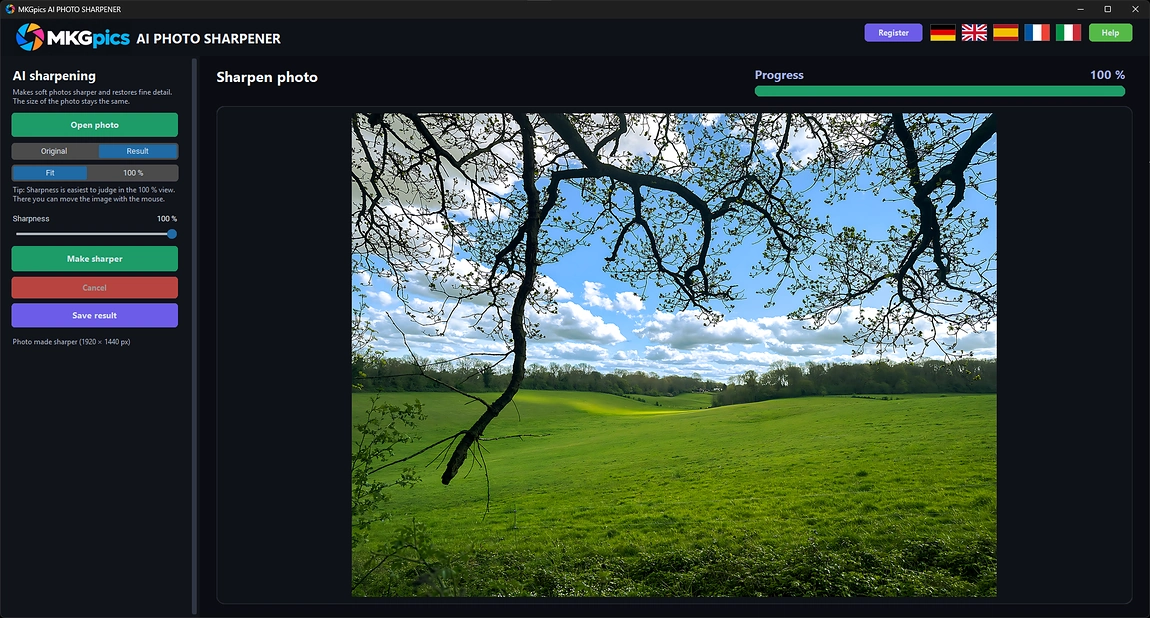
With the AI image sharpener, open a photo and press Make sharper. A run stops at any moment, and the Result view then shows the improved picture for comparison.Supported sources are PNG, JPG, JPEG, WebP and BMP. Results leave the program as PNG, JPG or WebP. Big photos are cut into overlapping tiles and merged again, so seams do not appear and the whole frame is covered.
AI image sharpener free download here
A tripod, a faster shutter and a precise autofocus prevent blur at the moment of shooting, but nobody repeats a vanished moment. Sharpening afterwards rescues the moment from the file that already exists.
After the first run, the preview updates instantly, because original and sharpened data are mixed on screen. Only the final export writes a file, so experiments cost nothing and repeat freely.
Start Fast to Sharpen Blurry Photos AI
Open the picture, press Make sharper, then fine tune the strength.After opening a photo, one click starts the calculation. The AI image sharpener handles the whole frame and shows its progress while it works. The sharpened picture appears in the preview and is ready for inspection.
Lower strength keeps a natural softness that flatters portraits, while full strength pushes lettering, plants and fur to maximum clarity. Edges and eyes show differences first, so watch them.
» Free download now
Switch to the full size view, go to the important area and compare Original with Result.
At this scale eyes, text and fine edges are checked. If textures look too crisp, a lower strength helps, and if blur is still visible, a higher strength. Each correction is visible at once, which keeps the whole process quick.
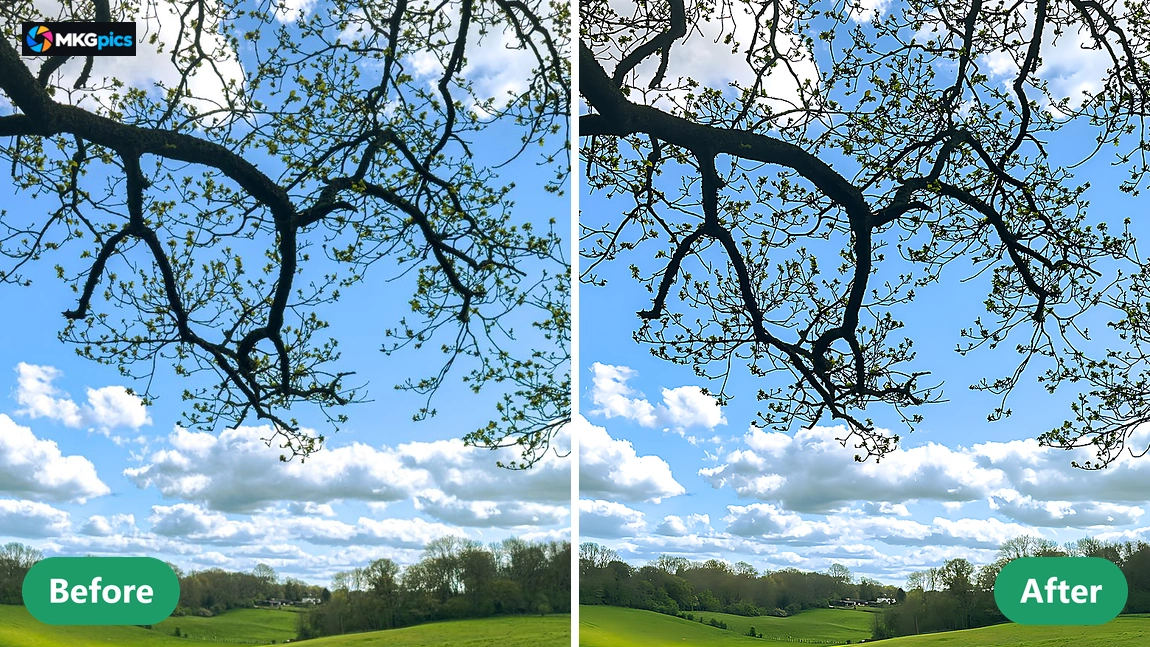
Because the source file is never touched, several versions are exported. A subtle one for an album and a strong one for a large print are made from the same photo, each saved under its own file name.
Cases for Soft Photos
From shaky holiday pictures to blurred documents, soft photos regain their clarity.Phone users shoot children, pets and sunsets while moving, and the result looks soft on a larger screen. One run brings back whiskers, faces and horizon lines, so cherished snapshots are worth printing again.
» Download free here
Photographers use the AI image sharpener for action scenes, event shots and portraits with a missed focus point. Sellers fix product pictures with unreadable labels, and archivists improve scanned prints that came out soft, each within a few minutes.
Every picture receives its own strength and its own inspection, so nothing is oversharpened by a preset.
AI Image Sharpener Questions Clarified
What does the AI image sharpener do?
It makes soft or blurry photos crisper by rebuilding fine detail with AI, and the width and height of the photo stay unchanged.
Does sharpening overwrite my file?
No. The sharpened picture is exported under its own name and the source file remains as it was.
Is a subscription needed to sharpen blurry photos AI style?
No. The program runs entirely on the own PC, comes as a free download and has neither subscription nor follow up expenses.
Who needs an AI image sharpener like this?
Wildlife, sports and event photographers, smartphone users, online sellers and hobby photographers who want blurry pictures rescued without uploading them anywhere.
How does the strength work?
It blends the original and the sharpened picture, and every change shows instantly without a new calculation.
Can a running calculation be stopped?
Yes. The calculation aborts immediately, and nothing is written to disk until the result is saved.
Does sharpen blurry photos AI work offline?
Yes, the sharpening happens on the own PC. Nothing is uploaded, and no internet connection is needed to process a photo.
Which image formats does it support?
Photos open as PNG, JPG, JPEG, WebP or BMP and are exported as PNG, JPG or WebP, and the source photo stays untouched.