



AI Image Denoiser for Night Shots and Old Scans with no AI Costs
Grain and color speckles disappear from dark and high sensitivity photos, while edges, textures and fine detail stay intact.Grain disappears in a single run with MKGpics AI PHOTO DENOISER, an AI image denoiser for the PC. The program analyzes the noise pattern of a photo and smooths it away, and the strength then adjusts up or down without a second calculation.

Each photo is inspected at full size, adjusted to taste and saved with a new file name next to the untouched original.
Functions Built into the AI Image Denoiser
- Removes grain, color noise and speckles from photos
- Detail, edges and textures stay sharp after cleaning
- Adjustable cleaning strength after one run
- Changing the strength needs no second calculation
- Fit view and full size view
- Original and Result switch for instant comparison
- Long calculations on large photos stop at any time
- Imports PNG, JPG, JPEG, WebP and BMP pictures
- Saves the cleaned photo as PNG, JPG or WebP
- Large photos are processed completely, tile by tile
- Cleaning runs locally, no photo is uploaded
- Newest Python AI libraries work locally, the AI itself costs nothing
- No subscription and no ongoing costs
Users Who Gain from Cleaner Photos
It serves everyone whose pictures suffer from grain, dark scenes or weak sensors.Photos stay on the PC, because the AI calculates locally and nothing is sent to a server or reused for training. Studios, agencies and clubs keep their archives in house, and hobbyists work with the same privacy.
- Event and wedding photographers rescue dim halls and late receptions.
- Concert and sports shooters clean pictures taken at high sensitivity.
- Smartphone users improve evening and indoor shots.
- Real estate and product photographers polish shadows and dark corners.
- Collectors digitize old prints and film scans with visible grain.
- Beginners and hobby photographers remove noise with one click, and professionals and designers check the result at full size.
Criteria for Good Noise Reduction
Convincing cleaning removes grain completely and keeps every fine structure in place.What happens to hair and fabric? Simple filters blur noise together with texture. The AI image denoiser recognizes what is noise and what is structure, so skin, leaves and printed text stay crisp after cleaning.
Example: a concert photo shot at high sensitivity shows colored speckles in the black background. After cleaning, the background turns calm and dark, while the faces keep their skin texture.
Which strength fits which photo? A night street carries more noise than a cloudy day. The strength blends between the original and the cleaned version, so a gentle value keeps some film grain for portraits and full strength suits dark halls.
Where does noise hide? In a small preview it stays invisible, and at full size it shows up. The full size view displays the real pixels and reaches dark corners, skies and faces.
Example: a scan of an old print shows grain across the sky. A low strength keeps the character of the paper, a high strength gives a smooth sky, and both versions are exported under their own file names.
Steps That Lead to the Cleaned Result
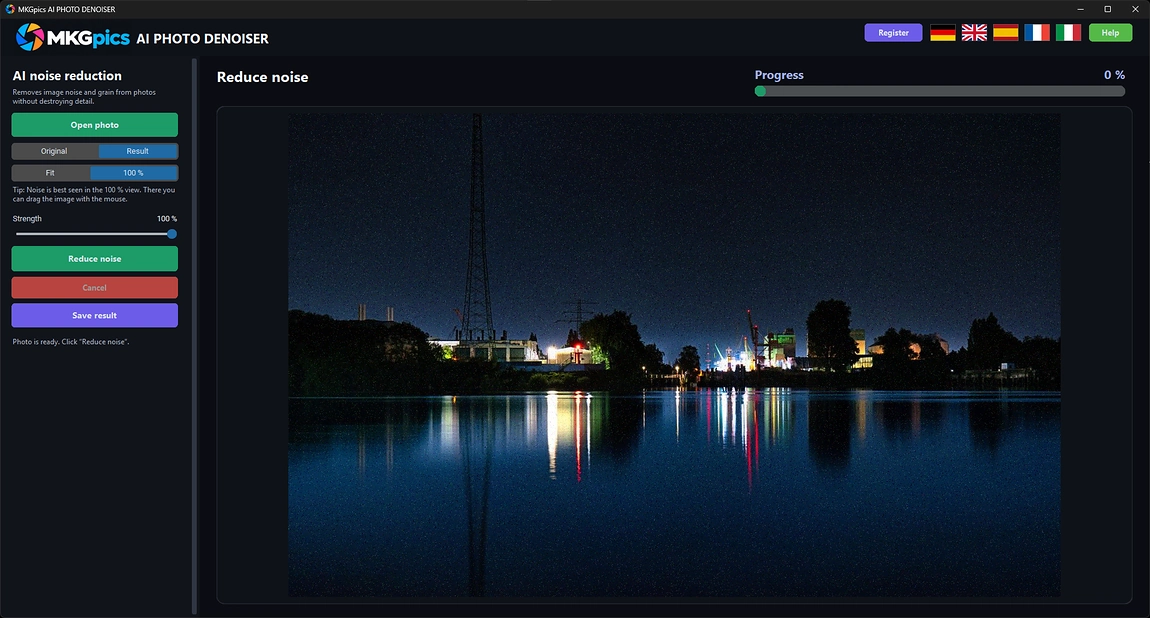
Open a photo and press Reduce noise. The calculation stops whenever needed, and the preview then shows the cleaned picture next to a one click switch to the original.Supported inputs are PNG, JPG, JPEG, WebP and BMP, and results leave the program as PNG, JPG or WebP. Big images are processed completely in tiles with overlapping edges, so no seams appear and nothing is cropped away.
AI image denoiser free download here
The AI image denoiser works on the finished file, so even pictures from older cameras and phones are repaired.
After the first run the result reacts at once, because the cleaned and the original data are blended on the screen. Strength, view and comparison are tried as many times as needed, and only the final export writes a file.
Start Cleaning Photos with AI Photo Noise Reduction
Three actions finish a photo: open it, press Reduce noise, set the strength.After the photo is open, one click starts the calculation. The AI image denoiser cleans the whole picture and shows the progress while it works. The finished result appears in the preview and is ready for comparison.
The strength serves the fine tuning. Full strength applies the complete cleaning, while lower values bring back some natural grain, which suits portraits and film looks. Dark areas show the difference first, so inspect shadows and skies.
» Free download now
Switch to the full size view to judge noise, and compare Original and Result before saving.
Check dark corners, sky areas and faces at full size. If edges look soft, lower the strength a little, and if grain is still visible, raise it. The check takes only a few moments for each photo.
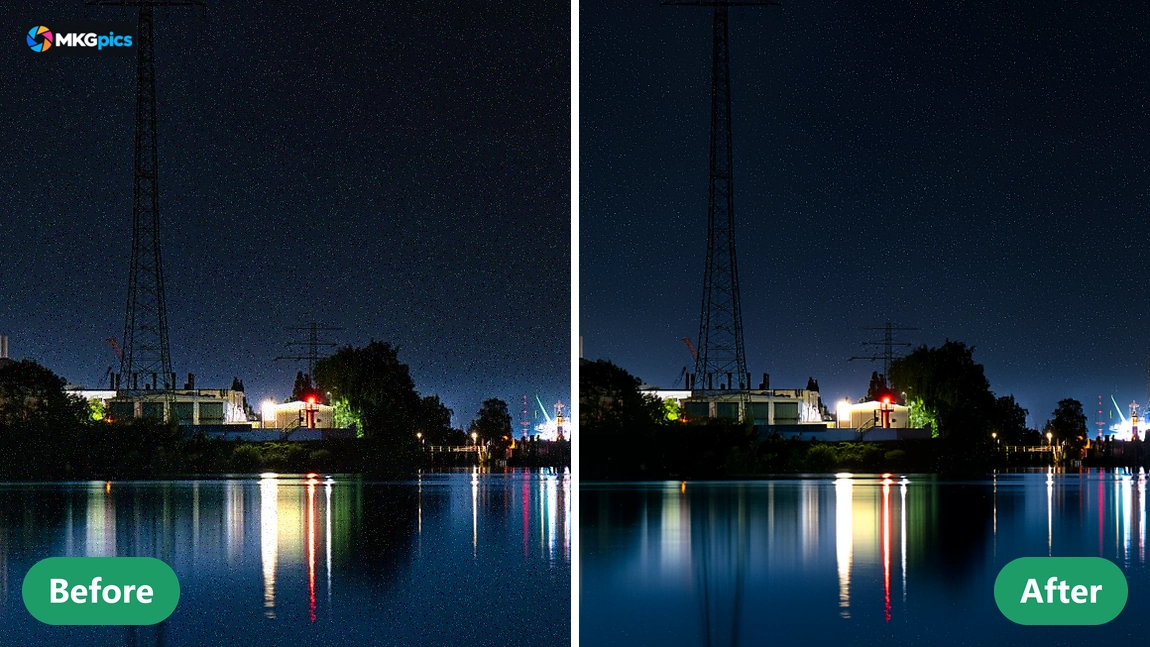
Because the source file is never touched, several variants are kept. A strong version for a web gallery and a gentle version for a large print come from the same photo, each with its own file name and its own strength.
Scenarios for Noisy Photos
From night street scenes to scanned prints, every grainy picture becomes cleaner.Event photographers rely on AI photo noise reduction for dark halls shot at high sensitivity and clean one picture after another. Faces keep their skin texture, and the black background loses its colored speckles, so pictures look ready for clients and magazines.
» Download free here
Phone users repair evening snapshots, restaurant tables and indoor birthdays with the AI image denoiser. Photographers of real estate and products smooth dim rooms and shadow areas, and archivists apply AI photo noise reduction to scans of old prints and slides.
Each scene gets the strength and view it needs, and every result is judged at full size. Nothing has to be configured for a series, which keeps repeated work simple.
AI Image Denoiser FAQ
What does the AI image denoiser do?
It removes grain and color noise from photos with AI, keeps edges and textures, and lets the strength be adjusted afterwards.
Does cleaning replace the original photo?
No. The cleaned photo gets a new file name next to the untouched original, so both versions stay available.
Is a subscription needed for AI photo noise reduction?
No. The program runs entirely on the PC and brings no subscription, no fees and no follow up expenses.
Who needs an AI image denoiser like this?
Event photographers, concert shooters, phone users, real estate and product photographers, and archivists with grainy scans who want clean pictures without any upload.
What does the strength change?
Full strength shows the complete cleaning, and lower values bring back some natural grain, with no new calculation after the first run.
Which image formats does it handle?
Input is PNG, JPG, JPEG, WebP or BMP, and output is PNG, JPG or WebP, while the source photo always stays untouched.
Does AI photo noise reduction work offline?
Yes, the cleaning runs on the own PC. No photo leaves it, and processing needs no internet connection.
Can I stop a running calculation?
Yes, the run ends at any moment, and the photo stays unchanged until a new run is started.