



AI Bokeh Effect for Portraits and Products without a Subscription and without Cloud
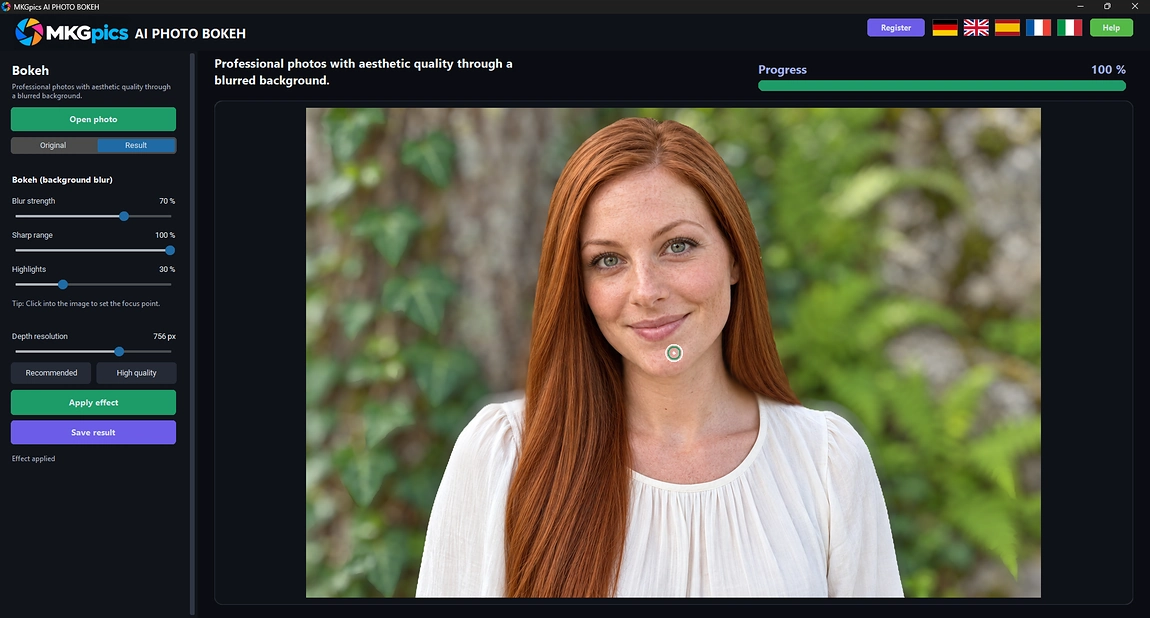
The AI measures the depth of each photo and turns the background into creamy bokeh while the subject stays sharp.A depth map turns any photo into a picture with a soft background: MKGpics AI PHOTO BOKEH is an AI bokeh effect program for the PC. The focus is set at the clicked point, everything behind it is blurred, and the AI is installed locally without a subscription.

The program turns ordinary snapshots into photos with a studio look.
What the AI Bokeh Effect Adds to a Photo
- Bokeh from any photo, no second shot needed
- The AI calculates a fresh depth map for every image
- Focus point set with one click inside the photo
- Blur strength adjustable from 0 to 100
- Sharp range controls how much around the subject stays crisp
- Highlights turn bright spots into round bokeh lights
- Depth resolution with Recommended and High quality presets
- Switch between original and result in the preview
- Imports PNG, JPG, JPEG, WebP and BMP photos
- Saves the result as PNG, JPG or WebP
- Calculation runs locally, no photo leaves the PC
- Up to date Python AI libraries run locally, the AI costs nothing
- No subscription and no ongoing costs
Creators Choosing MKGpics AI PHOTO BOKEH
It serves everyone whose photos need a calm background and a clearly visible subject.Privacy is built in: the AI calculates on the PC itself, so photos are never sent anywhere or used for training. Studios, agencies and schools keep every file in house, and hobbyists work just as freely.
- Portrait photographers add depth to pictures taken with phones or kit lenses.
- Online sellers separate products from cluttered rooms and shelves.
- Pet owners make dogs and cats stand out from busy gardens.
- Social media creators give posts and thumbnails a cinematic look.
- Hobby photographers, clubs and schools improve holiday and event photos.
- Professionals and designers fine tune the depth, while beginners and hobby photographers click the subject and are done.
Marks of a Convincing Bokeh
Believable depth needs a precise focus, a smooth falloff and round highlights.Why does a blurred background sometimes look fake? A flat blur treats a fence next to the subject like a mountain far away. The AI bokeh effect calculates a depth map first, so near areas stay softer than the subject and far areas blur more, exactly as a real lens would do.
Example: a dog sits in front of a busy garden. One click on its eye sets the focus, a medium blur removes the clutter, and the highlights setting turns sunlit leaves into round lights behind the fur.
How wide is the sharp range? A narrow range isolates a single face, a wide range keeps a whole group in focus. If the first focus feels wrong, a click on another spot sets a new one within seconds, and no setting has to be undone.
What do the highlights do? Street lamps and reflections grow into soft, round discs of light. Higher values make them larger and brighter, while lower values keep the effect discreet for product photos.
Example: a traveler photographs a flower in a crowded park. A click on the blossom sets the focus, and the visitors behind it melt into soft shapes while the petals stay sharp.
Path from a Loaded Photo to the Finished Blur
Open a photo, click the subject and apply the effect. The AI calculates the depth map first and then the blur, and a preview switch shows the original and the result next to each other before the file is saved.Supported inputs are PNG, JPG, JPEG, WebP and BMP. Finished photos are written as PNG, JPG or WebP. The program proposes a new file name ending in bokeh.
AI bokeh effect free download here
Cameras with large sensors and expensive lenses create bokeh by optics, but AI background blur reaches a similar look on any photo. The depth map replaces the lens, so a smartphone picture shows the same soft separation.
Each change of strength, range or highlights is applied with the next calculation, so a photo improves step by step. Depth resolution trades speed against detail, and the two presets Recommended and High quality set the balance.
Jump In with AI Background Blur
Three actions finish a photo: open it, click the focus point, apply the effect.After opening a photo, a click on the subject sets the focus. Blur strength, sharp range and highlights shape the look. With the AI bokeh effect the finished look shows up in the preview right after the calculation.
The depth resolution serves the fine tuning of the blur. Higher values read finer edges around hair and branches, lower values finish faster. Recommended finishes quickly for screens and social media, while High quality is the choice for portraits that will be printed large.
» Free download now
Start with a medium blur and raise it until the subject separates clearly from the background.
The AI bokeh effect looks artificial when pushed too far, while too little changes nothing. Values between 30 and 60 look natural for portraits. Pets and products take more, because their surroundings are busier and the subject is smaller.
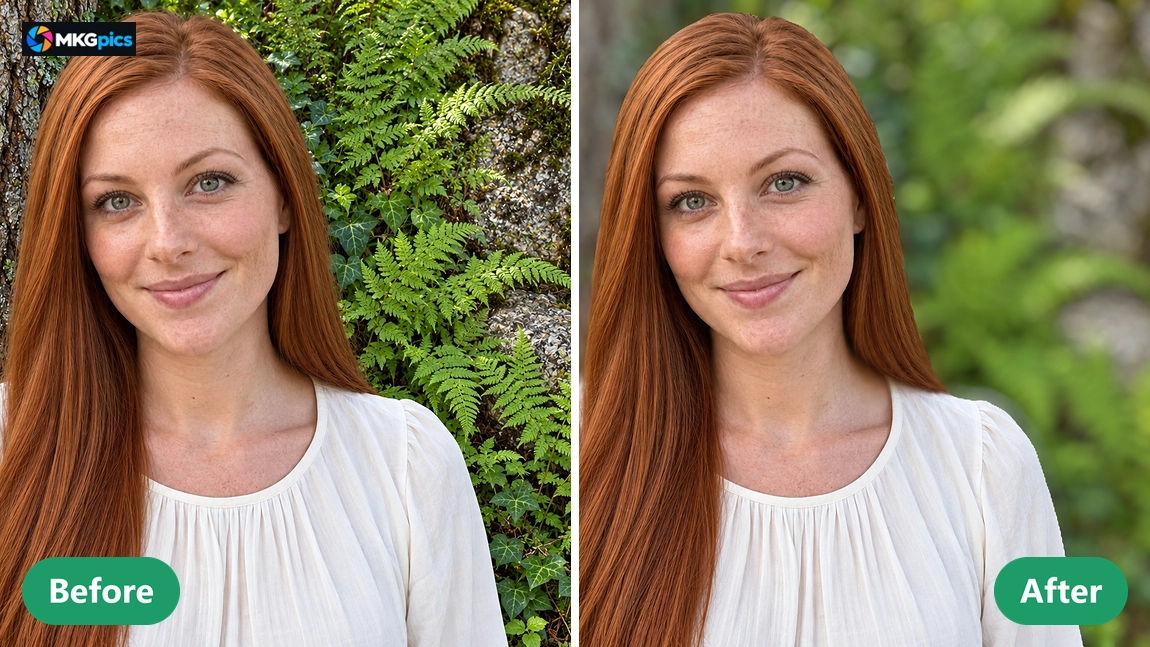
Because the program never touches the source file, different variants are saved side by side. A soft version for social media and a strong version for a poster come from the same photo, each with its own file name.
Situations Where Soft Backgrounds Help
From portraits to product shots, every subject gets room to stand out.Portrait and wedding photographers use AI background blur to rescue pictures taken with small cameras. A busy street or a crowded hall fades into soft color, and the faces in front gain a presence that previously needed a fast lens and a lot of space.
» Download free here
Sellers on marketplaces photograph goods at home and use AI background blur to hide shelves, cables and clutter. The product stays sharp, and the listing looks tidy without a studio, a backdrop or a second person.
Pet owners, hobby gardeners and travelers make flowers, animals and landmarks the clear center of the picture. Each scene receives its own focus and blur.
Your Questions on the AI Bokeh Effect
What does the AI bokeh effect do?
It calculates a depth map from one photo, keeps the clicked subject sharp and blurs the background into soft bokeh, including round highlights.
Is the original photo changed by the blur?
No. The blurred version is saved under a new file name, and the original photo stays untouched.
Is a subscription needed for AI background blur?
No. The program is a free download for the PC, runs fully on the own computer and comes without subscription or follow up expenses.
Who needs an AI bokeh effect like this?
Portrait photographers, online sellers, pet owners, creators, hobby photographers, clubs and schools who want a calm background without a fast lens or a second shot.
What do blur strength, sharp range and highlights change?
Blur strength sets how soft the background becomes, sharp range sets how much stays crisp around the subject, and highlights enlarge bright spots into round lights.
Which file formats does it support?
Photos open as PNG, JPG, JPEG, WebP or BMP and are saved as PNG, JPG or WebP, while the original file is never overwritten.
Does AI background blur work offline?
Yes, the depth calculation happens on the own PC. Nothing is uploaded, and applying the effect needs no internet connection.
Can I change the focus point afterward?
Yes, a new click sets another focus point and the effect is applied again, so the subject switches from a face to a flower within seconds.