



Batch AI Image Denoiser for Large Photo Collections with no AI Costs
Grainy night shots, high ISO files and dark phone pictures come out clean, folder by folder, as PNG or JPG.Whole shoots are cleaned while you do something else: MKGpics AI BATCH PHOTO DENOISER is a batch AI image denoiser that processes hundreds of photos in sequence. There is no subscription, and no ongoing costs ever appear.

The program handles a single event gallery as easily as years of archived images, at the strength that is picked.
What the Batch AI Image Denoiser Handles
- Removes grain and color noise from many photos automatically
- Cleans entire shoots in one run
- Three strength profiles: Gentle, Medium and Full
- Fine adjustment of the strength
- Gentle strength preserves natural texture
- Large photos are processed in overlapping sections
- Output as PNG or JPG in high quality
- Accepts PNG, JPG, JPEG, WebP, BMP and TIFF
- Offers to take over the complete folder of a selected file
- Names results with the ending _denoised
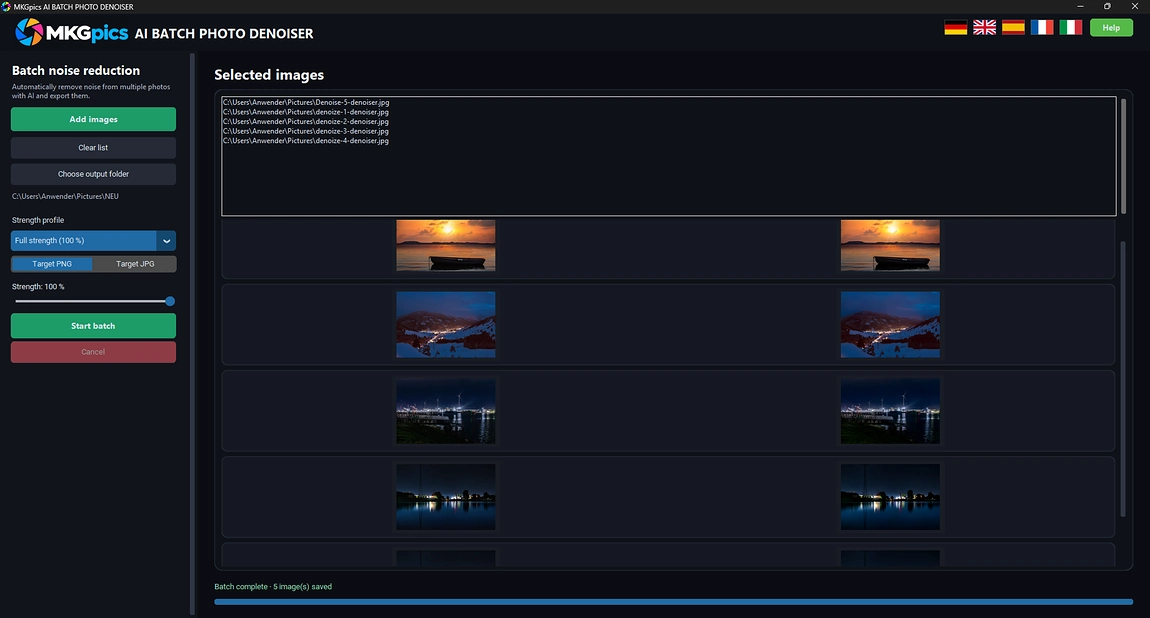
- Side by side preview of source and cleaned photo
- Never writes into the folder of the originals
- Processing halts immediately on request, finished results remain
- Lists failed files together after the run
- Powered by the latest local Python libraries for AI, with no extra costs for the AI
- Works offline on the local PC
Photographers Who Need MKGpics AI BATCH PHOTO DENOISER
It is made for people who shoot in poor light or keep old files and want clean pictures at scale.Because the AI works locally, client galleries and private pictures stay on the PC and never train a model.
- Event and wedding photographers clean hundreds of dim indoor pictures after the shoot.
- Night and city photographers remove grain from long exposures and high ISO series.
- Real estate and product photographers smooth shadows in interior shots.
- Online sellers and bloggers improve phone photos taken in weak light.
- Archives and scan services restore grainy old digital files and film scans.
- The AI batch photo denoiser fits beginners and hobby photographers as well as professionals and designers.
How the Batch Denoiser Cleans Photo Series
The program takes whole folders, protects fine detail and leaves the source files alone.The program takes the entire list and finishes it unattended.
Example: an event photographer returns with a folder of dark hall shots. One run with Medium strength cleans the whole series, and the preview shows each finished photo while the folder is processed.
Gentle keeps a natural grain structure, Medium suits noisy series, and Full strength cleans heavy noise from the darkest shots. The fine adjustment refines the strength in small steps.
Noise leaves while skin and fabric do not turn into plastic, because the chosen strength blends the cleaned version with the original. Big photos are processed in overlapping sections, which keeps the result even across the whole frame, and output as PNG or high quality JPG covers archive copies as well as web versions.
Example: one file in the series cannot be read. It is reported afterwards, the rest of the series continues, and the source folder stays unchanged because the program will not write into it.
Batch Photo Noise Reduction AI from Start to Finish
The batch AI image denoiser opens the folder, applies the chosen strength to each picture and saves the result in the chosen format. Picking a single file is sufficient, since the program offers to take every image from that folder.Typical material includes indoor events, concerts, night streets, astro scenes, interiors, product shots and phone pictures. TIFF and BMP files work as well as JPG or WebP, and the cleaned copies are saved with the suffix _denoised.
Batch AI image denoiser free download here
Every frame of a series needs the same cleaning step. The program takes over this routine: it runs down the list, shows each finished photo in the preview and keeps going until the folder is done.
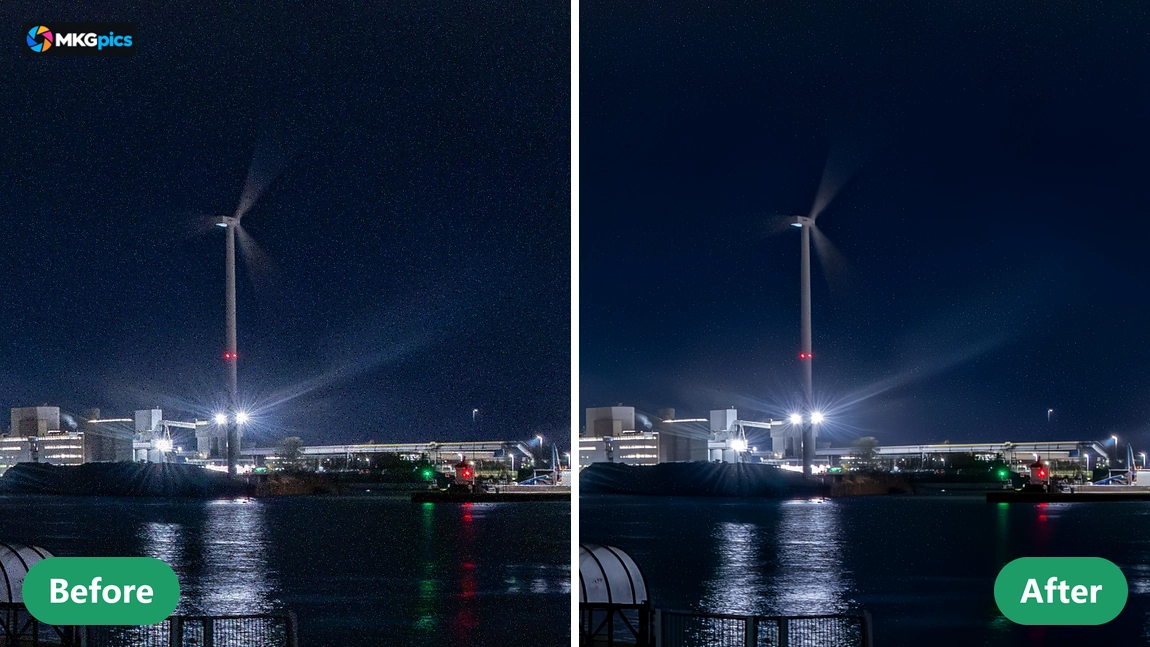
Source and cleaned version appear next to each other in the preview, so the strength is judged while the run continues and adjusted for the next batch.
Kick Off with Your First Shoot
The first run needs almost no setup, because sensible defaults are already selected.Four steps do the job: add photos, choose an output folder, set strength and format, click Start batch. Full strength and PNG are preselected, which lets the very first run begin immediately without any further configuration.
The sidebar holds strength, format and folder, while list and preview fill the main area. One click on Clear list empties the queue and prepares the next shoot right away.
» Free download now
The run halts immediately, and all photos saved until then remain in the output folder.
When processing ends normally, a single button opens the output folder with the denoised photos. Failed files are named in a list, all others are already saved, and the ending _denoised keeps results apart from the originals.
Everything is calculated on the local PC. Photos are not uploaded, and models are not trained with them.
Assignments for Cleaning Noisy Photos
From dim event halls to old archive scans: choose one strength and the AI handles the series.The batch AI image denoiser cleans concert pictures, wedding receptions, street scenes at night, interiors, product photos and phone shots. Gentle fits portraits, Medium fits mixed series, and Full strength rescues the darkest frames of a shoot.
» Download free here
After an evening event with eight hundred pictures, load the folder, choose JPG and start. The shared setting gives every frame the same look, and the program asks for nothing beyond the download.
Galleries, stock uploads, prints and archives receive finished PNG or JPG files for delivery. A single run cleans the whole folder and leaves a tidy output folder next to the untouched originals.
Asked and Answered About the Batch AI Image Denoiser
What does the batch AI image denoiser do?
It cleans grain and color noise from many photos at once, with three strength profiles and fine adjustment, and saves PNG or JPG while the preview shows every result.
Does it really work in batches?
Yes. It is a true batch program: any number of photos or folders pass through the AI one after another, and every cleaned copy lands in the output folder.
Is a subscription required to use it?
No subscription and no ongoing costs. The program is a free download for the PC and keeps working locally afterwards.
How does batch photo noise reduction AI work?
Load the photos, pick a target folder, select strength and format, and press Start batch. Each listed image is cleaned and saved by the AI.
Which strength profiles does the program offer?
Gentle, Medium and Full strength. A fine adjustment sets any value in between.
Which file formats does it read and write?
It reads PNG, JPG, JPEG, WebP, BMP and TIFF. Results are written as PNG or as high quality JPG with the ending _denoised.
Does the batch AI image denoiser upload photos?
No. All calculation happens on the local PC, so no photo leaves it and none is used for training.
Is it possible to stop a running batch?
Yes. Processing halts immediately. Finished photos stay saved in the output folder, and failed files are listed together afterwards.